mlflow.shap
- mlflow.shap.get_default_conda_env()[source]
- 返回
由
save_explainer()和log_explainer()调用生成的 MLflow Models 的默认 Conda 环境。
- mlflow.shap.get_default_pip_requirements()[source]
此模型版本生成的 MLflow Models 的默认 pip 依赖项列表。调用
save_explainer()和log_explainer()将生成一个 pip 环境,该环境至少包含这些依赖项。
- mlflow.shap.get_underlying_model_flavor(model)[source]
查找底层模型版本。
- 参数
model – Explainer 的底层模型。
- mlflow.shap.load_explainer(model_uri)[source]
从本地文件或运行加载 SHAP explainer。
- 参数
model_uri –
MLflow 模型在 URI 格式中的位置。例如:
/Users/me/path/to/local/modelrelative/path/to/local/models3://my_bucket/path/to/modelruns:/<mlflow_run_id>/run-relative/path/to/modelmodels:/<model_name>/<model_version>models:/<model_name>/<stage>
For more information about supported URI schemes, see Referencing Artifacts.
- 返回
SHAP explainer。
- mlflow.shap.log_explainer(explainer, artifact_path: str | None = None, serialize_model_using_mlflow=True, conda_env=None, code_paths=None, registered_model_name=None, signature: mlflow.models.signature.ModelSignature = None, input_example: Union[pandas.core.frame.DataFrame, numpy.ndarray, dict, list, csr_matrix, csc_matrix, str, bytes, tuple] = None, await_registration_for=300, pip_requirements=None, extra_pip_requirements=None, name: str | None = None, metadata=None, params: dict[str, typing.Any] | None = None, tags: dict[str, typing.Any] | None = None, model_type: str | None = None, step: int = 0, model_id: str | None = None)[source]
将 SHAP explainer 作为当前运行的 MLflow 伪影进行记录。
- 参数
explainer – 要保存的 SHAP explainer。
artifact_path – Deprecated. Use name instead.
serialize_model_using_mlflow – 如果设置为 True,MLflow 将提取底层模型并将其序列化为 MLmodel,否则它将使用 SHAP 的内部序列化。默认为 True。目前 MLflow 序列化仅支持“sklearn”或“pytorch”版本的模型。
conda_env –
Conda 环境的字典表示或 conda 环境 yaml 文件的路径。如果提供,这将描述模型应运行的环境。至少,它应该指定 get_default_conda_env() 中包含的依赖项。如果为
None,则将一个由mlflow.models.infer_pip_requirements()推断的 pip 依赖项的环境添加到模型中。如果依赖项推断失败,则回退使用 get_default_pip_requirements。来自conda_env的 pip 依赖项将写入 piprequirements.txt文件,而完整的 conda 环境将写入conda.yaml。以下是 conda 环境的字典表示的示例。{ "name": "mlflow-env", "channels": ["conda-forge"], "dependencies": [ "python=3.8.15", { "pip": [ "shap==x.y.z" ], }, ], }
code_paths –
A list of local filesystem paths to Python file dependencies (or directories containing file dependencies). These files are prepended to the system path when the model is loaded. Files declared as dependencies for a given model should have relative imports declared from a common root path if multiple files are defined with import dependencies between them to avoid import errors when loading the model.
For a detailed explanation of
code_pathsfunctionality, recommended usage patterns and limitations, see the code_paths usage guide.registered_model_name – 如果提供,则在
registered_model_name下创建一个模型版本,如果给定名称的注册模型不存在,也会创建该注册模型。signature –
ModelSignature描述了模型输入和输出Schema。模型签名可以从具有有效模型输入的数据集(例如,省略目标列的训练数据集)和有效模型输出的数据集(例如,在训练数据集上生成的模型预测)中推断,例如:from mlflow.models import infer_signature train = df.drop_column("target_label") predictions = ... # compute model predictions signature = infer_signature(train, predictions)
input_example – 一个或多个有效的模型输入实例。输入示例用作要馈送给模型的数据的提示。它将被转换为 Pandas DataFrame,然后使用 Pandas 的面向拆分(split-oriented)格式序列化为 json,或者转换为 numpy 数组,其中示例将通过转换为列表来序列化为 json。字节将进行 base64 编码。当
signature参数为None时,输入示例用于推断模型签名。await_registration_for – 等待模型版本完成创建并处于
READY状态的秒数。默认情况下,函数等待五分钟。指定 0 或 None 可跳过等待。pip_requirements – pip 依赖项字符串的可迭代对象(例如
["shap", "-r requirements.txt", "-c constraints.txt"])或本地文件系统上 pip 依赖项文件的字符串路径(例如"requirements.txt")。如果提供,这将描述模型应运行的环境。如果为None,则通过mlflow.models.infer_pip_requirements()从当前软件环境中推断默认的依赖项列表。如果依赖项推断失败,则回退使用 get_default_pip_requirements。依赖项和约束都会被自动解析并写入相应的requirements.txt和constraints.txt文件,并作为模型的一部分存储。依赖项也会被写入模型 conda 环境(conda.yaml)文件的pip部分。extra_pip_requirements –
pip 依赖项字符串的可迭代对象(例如
["pandas", "-r requirements.txt", "-c constraints.txt"])或本地文件系统上 pip 依赖项文件的字符串路径(例如"requirements.txt")。如果提供,这将描述附加到根据用户当前软件环境自动生成的默认 pip 依赖项集中的其他 pip 依赖项。依赖项和约束都会被自动解析并写入相应的requirements.txt和constraints.txt文件,并作为模型的一部分存储。依赖项也会被写入模型 conda 环境(conda.yaml)文件的pip部分。警告
以下参数不能同时指定
conda_envpip_requirementsextra_pip_requirements
此示例演示了如何使用
pip_requirements和extra_pip_requirements指定 pip requirements。name – 模型名称。
metadata – 传递给模型并存储在 MLmodel 文件中的自定义元数据字典。
params – 要与模型一起记录的参数字典。
tags – 要与模型一起记录的标签字典。
model_type – 模型的类型。
step – 记录模型输出和指标的步骤
model_id – 模型的 ID。
- mlflow.shap.log_explanation(predict_function, features, artifact_path=None)[source]
给定一个能够计算提供的
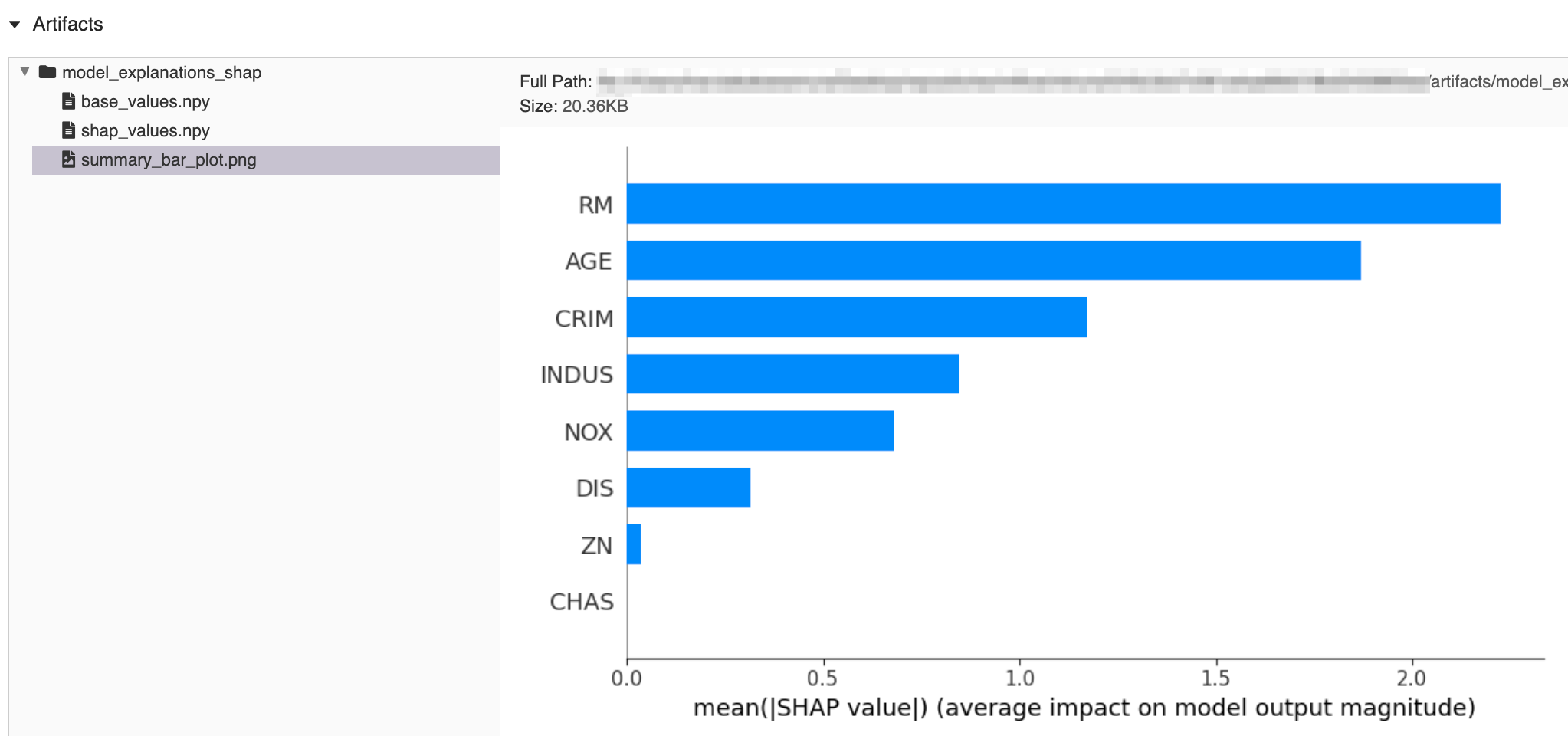
features上的 ML 模型输出的predict_function,计算并记录 ML 模型输出的解释。解释将作为伪影目录进行记录,该目录包含由 SHAP (SHapley Additive exPlanations) 生成的以下项目。基值
SHAP 值(使用 shap.KernelExplainer 计算)
摘要条形图(显示每个特征对模型输出的平均影响)
- 参数
predict_function –
一个用于计算模型输出的函数(例如,scikit-learn 分类器的
predict_proba方法)。必须具有以下签名def predict_function(X) -> pred: ...
X: 一个类数组对象,其形状应为 (# 样本, # 特征)。pred: 一个类数组对象,其形状应为 (# 样本)(回归器)或 (# 类别, # 样本)(分类器)。对于分类器,pred中的值应对应于每个类别的预测概率。
可接受的类数组对象类型
numpy.arraypandas.DataFrameshap.common.DenseDatascipy.sparse matrix
features –
一个特征矩阵,用于计算 SHAP 值。提供的特征的形状应为 (# 样本, # 特征),并且可以是上面列出的类数组对象类型之一。
注意
用于 shap.KernelExplainer 的背景数据是通过对
features使用 shap.kmeans 进行子采样生成的。背景数据大小限制为 100 行,以提高性能。artifact_path – 保存解释的相对于运行的伪影路径。如果未指定,则默认为“model_explanations_shap”。
- 返回
已记录解释的伪影 URI。
import os

import numpy as np
import pandas as pd
from sklearn.datasets import load_diabetes
from sklearn.linear_model import LinearRegression

import mlflow
from mlflow import MlflowClient

# prepare training data
X, y = dataset = load_diabetes(return_X_y=True, as_frame=True)
X = pd.DataFrame(dataset.data[:50, :8], columns=dataset.feature_names[:8])
y = dataset.target[:50]

# train a model
model = LinearRegression()
model.fit(X, y)

# log an explanation
with mlflow.start_run() as run:
    mlflow.shap.log_explanation(model.predict, X)

# list artifacts
client = MlflowClient()
artifact_path = "model_explanations_shap"
artifacts = [x.path for x in client.list_artifacts(run.info.run_id, artifact_path)]
print("# artifacts:")
print(artifacts)

# load back the logged explanation
dst_path = client.download_artifacts(run.info.run_id, artifact_path)
base_values = np.load(os.path.join(dst_path, "base_values.npy"))
shap_values = np.load(os.path.join(dst_path, "shap_values.npy"))

print("\n# base_values:")
print(base_values)
print("\n# shap_values:")
print(shap_values[:3])
# artifacts:
['model_explanations_shap/base_values.npy',
 'model_explanations_shap/shap_values.npy',
 'model_explanations_shap/summary_bar_plot.png']

# base_values:
20.502000000000002

# shap_values:
[[ 2.09975523  0.4746513   7.63759026  0.        ]
 [ 2.00883109 -0.18816665 -0.14419184  0.        ]
 [ 2.00891772 -0.18816665 -0.14419184  0.        ]]
- mlflow.shap.save_explainer(explainer, path, serialize_model_using_mlflow=True, conda_env=None, code_paths=None, mlflow_model=None, signature: mlflow.models.signature.ModelSignature = None, input_example: Union[pandas.core.frame.DataFrame, numpy.ndarray, dict, list, csr_matrix, csc_matrix, str, bytes, tuple] = None, pip_requirements=None, extra_pip_requirements=None, metadata=None)[source]
将 SHAP explainer 保存到本地文件系统上的路径。生成一个包含以下模型的 MLflow 模型:
- 参数
explainer – 要保存的 SHAP explainer。
path – 保存 explainer 的本地路径。
serialize_model_using_mlflow – 如果设置为 True,MLflow 将提取底层模型并将其序列化为 MLmodel,否则它将使用 SHAP 的内部序列化。默认为 True。目前 MLflow 序列化仅支持“sklearn”或“pytorch”版本的模型。
conda_env –
Conda 环境的字典表示或 conda 环境 yaml 文件的路径。如果提供,这将描述模型应运行的环境。至少,它应该指定 get_default_conda_env() 中包含的依赖项。如果为
None,则将一个由mlflow.models.infer_pip_requirements()推断的 pip 依赖项的环境添加到模型中。如果依赖项推断失败,则回退使用 get_default_pip_requirements。来自conda_env的 pip 依赖项将写入 piprequirements.txt文件,而完整的 conda 环境将写入conda.yaml。以下是 conda 环境的字典表示的示例。{ "name": "mlflow-env", "channels": ["conda-forge"], "dependencies": [ "python=3.8.15", { "pip": [ "shap==x.y.z" ], }, ], }
code_paths –
A list of local filesystem paths to Python file dependencies (or directories containing file dependencies). These files are prepended to the system path when the model is loaded. Files declared as dependencies for a given model should have relative imports declared from a common root path if multiple files are defined with import dependencies between them to avoid import errors when loading the model.
For a detailed explanation of
code_pathsfunctionality, recommended usage patterns and limitations, see the code_paths usage guide.mlflow_model – 要添加此 flavor 的
mlflow.models.Model。signature –
ModelSignature描述了模型输入和输出Schema。模型签名可以从具有有效模型输入的数据集(例如,省略目标列的训练数据集)和有效模型输出的数据集(例如,在训练数据集上生成的模型预测)中推断,例如:from mlflow.models import infer_signature train = df.drop_column("target_label") predictions = ... # compute model predictions signature = infer_signature(train, predictions)
input_example – 一个或多个有效的模型输入实例。输入示例用作要馈送给模型的数据的提示。它将被转换为 Pandas DataFrame,然后使用 Pandas 的面向拆分(split-oriented)格式序列化为 json,或者转换为 numpy 数组,其中示例将通过转换为列表来序列化为 json。字节将进行 base64 编码。当
signature参数为None时,输入示例用于推断模型签名。pip_requirements – pip 依赖项字符串的可迭代对象(例如
["shap", "-r requirements.txt", "-c constraints.txt"])或本地文件系统上 pip 依赖项文件的字符串路径(例如"requirements.txt")。如果提供,这将描述模型应运行的环境。如果为None,则通过mlflow.models.infer_pip_requirements()从当前软件环境中推断默认的依赖项列表。如果依赖项推断失败,则回退使用 get_default_pip_requirements。依赖项和约束都会被自动解析并写入相应的requirements.txt和constraints.txt文件,并作为模型的一部分存储。依赖项也会被写入模型 conda 环境(conda.yaml)文件的pip部分。extra_pip_requirements –
pip 依赖项字符串的可迭代对象(例如
["pandas", "-r requirements.txt", "-c constraints.txt"])或本地文件系统上 pip 依赖项文件的字符串路径(例如"requirements.txt")。如果提供,这将描述附加到根据用户当前软件环境自动生成的默认 pip 依赖项集中的其他 pip 依赖项。依赖项和约束都会被自动解析并写入相应的requirements.txt和constraints.txt文件,并作为模型的一部分存储。依赖项也会被写入模型 conda 环境(conda.yaml)文件的pip部分。警告
以下参数不能同时指定
conda_envpip_requirementsextra_pip_requirements
此示例演示了如何使用
pip_requirements和extra_pip_requirements指定 pip requirements。metadata – 传递给模型并存储在 MLmodel 文件中的自定义元数据字典。