端到端评判器工作流
本指南将引导您完成使用 MLflow 的评判器 API 开发和优化自定义 LLM 评判器的完整生命周期。
此工作流为何重要
系统化开发
通过明确的指标和目标,从主观评估转向数据驱动的评判器开发。
人机对齐
通过结构化反馈确保您的评判器能够反映人类的专业知识和领域知识。
持续改进
根据实际性能和不断变化的需求,迭代和提高评判器的准确性。
生产就绪
放心部署评判器,因为它们已经过测试并符合您的质量标准。
开发周期
创建评判器
收集反馈
与人类对齐
测试与注册
第 1 步:创建初始评判器
首先定义您的评估标准
python
from typing import Literal
import mlflow
from mlflow.genai.judges import make_judge
from mlflow.entities import AssessmentSource, AssessmentSourceType

# Create experiment for judge development
experiment_id = mlflow.create_experiment("support-judge-development")
mlflow.set_experiment(experiment_id=experiment_id)

# Create a judge for evaluating customer support responses
support_judge = make_judge(
    name="support_quality",
    instructions="""
    Evaluate the quality of this customer support response.

    Rate as one of: excellent, good, needs_improvement, poor

    Consider:
    - Does it address the customer's issue?
    - Is the tone professional and empathetic?
    - Are next steps clear?

    Focus on {{ outputs }} responding to {{ inputs }}.
    """,
    model="anthropic:/claude-opus-4-1-20250805",
    feedback_value_type=Literal["excellent", "good", "needs_improvement", "poor"],
)
第 2 步:生成轨迹并收集反馈
运行您的应用程序以生成轨迹,然后收集人类反馈
python
# Generate traces from your application
@mlflow.trace
def customer_support_app(issue):
    # Your application logic here
    return {"response": f"I'll help you with: {issue}"}


# Run application to generate traces
issues = [
    "Password reset not working",
    "Billing discrepancy",
    "Feature request",
    "Technical error",
]

trace_ids = []
for issue in issues:
    with mlflow.start_run(experiment_id=experiment_id):
        result = customer_support_app(issue)
        trace_id = mlflow.get_last_active_trace_id()
        trace_ids.append(trace_id)

        # Judge evaluates the trace
        assessment = support_judge(inputs={"issue": issue}, outputs=result)

        # Log judge's assessment
        mlflow.log_assessment(trace_id=trace_id, assessment=assessment)
收集人类反馈
在运行评判器处理轨迹后,收集人类反馈以建立真实情况
- MLflow UI(推荐)
- 编程方式(现有标签)
何时使用:您需要为评判器对齐收集人类反馈。
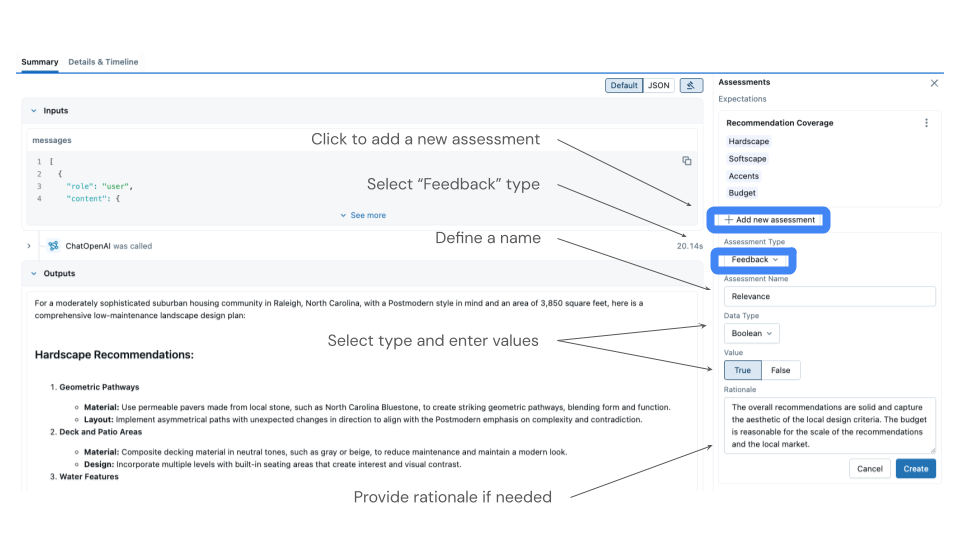
MLflow UI 提供了审查轨迹和添加反馈的最直观方式。
如何收集反馈
- 打开 MLflow UI 并导航到您的实验。
- 转到“轨迹”选项卡以查看所有生成的轨迹。
- 单击单个轨迹进行审查。
- 输入数据(客户问题)
- 输出响应
- 评判器的初步评估
- 通过单击“添加反馈”来添加您的反馈。
- 选择与您的评判器匹配的评估名称(例如,“support_quality”)。
- 提供您的专家评分(优秀、良好、需要改进或差)。
谁应该提供反馈?
如果您不是领域专家
- 请领域专家或其他开发人员通过 MLflow UI 提供标签。
- 将轨迹分配给具有相关专业知识的团队成员。
- 考虑组织反馈会议,让专家一起审查批次。
如果您是领域专家
- 直接在 MLflow UI 中审查轨迹并添加您的专家评估。
- 创建评分标准或指南文档以确保一致性。
- 记录您的评估标准以供将来参考。
UI 会自动以正确的格式记录反馈以进行对齐。
何时使用:您已经拥有数据的真实情况标签。
如果您有现有的真实情况标签,请以编程方式记录它们。
python
# Example: You have ground truth labels
ground_truth = {
    trace_ids[0]: "excellent",  # Known good response
    trace_ids[1]: "poor",  # Known bad response
    trace_ids[2]: "good",  # Known acceptable response
}

for trace_id, truth_value in ground_truth.items():
    mlflow.log_feedback(
        trace_id=trace_id,
        name="support_quality",  # MUST match judge name
        value=truth_value,
        source=AssessmentSource(
            source_type=AssessmentSourceType.HUMAN, source_id="ground_truth"
        ),
    )
第 3 步:使评判器与人类反馈对齐
使用 SIMBA 优化器提高评判器的准确性。
python
# Retrieve traces with both judge and human assessments
traces = mlflow.search_traces(experiment_ids=[experiment_id], return_type="list")

# Filter for traces with both assessments
aligned_traces = []
for trace in traces:
    assessments = trace.search_assessments(name="support_quality")
    has_judge = any(
        a.source.source_type == AssessmentSourceType.LLM_JUDGE for a in assessments
    )
    has_human = any(
        a.source.source_type == AssessmentSourceType.HUMAN for a in assessments
    )

    if has_judge and has_human:
        aligned_traces.append(trace)

print(f"Found {len(aligned_traces)} traces with both assessments")

# Align the judge (requires at least 10 traces)
if len(aligned_traces) >= 10:
    # Option 1: Use default optimizer (recommended for simplicity)
    aligned_judge = support_judge.align(aligned_traces)

    # Option 2: Explicitly specify optimizer with custom model
    # from mlflow.genai.judges.optimizers import SIMBAAlignmentOptimizer
    # optimizer = SIMBAAlignmentOptimizer(model="anthropic:/claude-opus-4-1-20250805")
    # aligned_judge = support_judge.align(aligned_traces, optimizer)

    print("Judge aligned successfully!")
else:
    print(f"Need at least 10 traces (have {len(aligned_traces)})")
第 4 步:测试与注册
测试对齐后的评判器,并在准备好时注册。
python
# Test the aligned judge on new data
test_cases = [
    {
        "inputs": {"issue": "Can't log in"},
        "outputs": {"response": "Let me reset your password for you."},
    },
    {
        "inputs": {"issue": "Refund request"},
        "outputs": {"response": "I'll process that refund immediately."},
    },
]

# Evaluate with aligned judge
for case in test_cases:
    assessment = aligned_judge(**case)
    print(f"Issue: {case['inputs']['issue']}")
    print(f"Judge rating: {assessment.value}")
    print(f"Rationale: {assessment.rationale}\n")

# Register the aligned judge for production use
aligned_judge.register(experiment_id=experiment_id)
print("Judge registered and ready for deployment!")
第 5 步:在生产环境中使用注册的评判器
使用 mlflow.genai.evaluate() 检索并使用您注册的评判器。
python
from mlflow.genai.scorers import get_scorer
import pandas as pd

# Retrieve the registered judge
production_judge = get_scorer(name="support_quality", experiment_id=experiment_id)

# Prepare evaluation data
eval_data = pd.DataFrame(
    [
        {
            "inputs": {"issue": "Can't access my account"},
            "outputs": {"response": "I'll help you regain access immediately."},
        },
        {
            "inputs": {"issue": "Slow website performance"},
            "outputs": {"response": "Let me investigate the performance issues."},
        },
    ]
)

# Run evaluation with the aligned judge
results = mlflow.genai.evaluate(data=eval_data, scorers=[production_judge])

# View results and metrics
print("Evaluation metrics:", results.metrics)
print("\nDetailed results:")
print(results.tables["eval_results_table"])

# Assessments are automatically logged to the traces
# You can view them in the MLflow UI Traces tab
最佳实践
清晰的说明
从反映您领域要求的具体、明确的评估标准开始。
高质量反馈
确保人类反馈来自了解您评估标准的领域专家。
充足的数据
收集至少 10-15 个带有评估的轨迹,以便有效对齐。
经常迭代
随着您的应用程序的演变和新边缘情况的出现,定期重新对齐评判器。