MLflow 3
探索下一代 MLflow,它旨在简化您的 AI 实验,并加速您从想法到生产的旅程。MLflow 3 为 GenAI 工作流带来了前沿支持,能够将生成式 AI 模型无缝集成到您的项目中。
什么是 MLflow 3?
MLflow 3 为机器学习模型、AI 应用和智能体(agents)提供了一流的实验跟踪、可观测性和性能评估!有了 MLflow 3,现在比以往任何时候都更容易:
- 在所有环境中集中跟踪和分析您的模型、提示、智能体和 AI 应用的性能,从开发笔记本中的交互式查询到生产批处理或实时服务部署。
- 借助 MLflow 跟踪和评估功能所支持的增强的性能比较体验,为生产选择最佳的模型、提示、智能体和 AI 应用。
MLflow 3 有哪些新功能?
以下是 MLflow 3 新功能的简要亮点:
MLflow 3 引入了专为 GenAI 应用打造的版本控制机制,而不仅仅是模型构件。新的 LoggedModel 实体作为元数据中心,将每个概念性的应用版本与其特定的外部代码(例如 Git 提交)、配置,以及其他 MLflow 实体(如跟踪和评估运行)链接起来。新的版本控制机制也无缝适用于传统的机器学习模型和深度学习检查点。
增强的模型跟踪提供了模型、运行、跟踪、提示和评估指标之间的全面血缘关系。新的以模型为中心的设计允许您对来自不同开发环境和生产环境的跟踪和指标进行分组,从而实现跨模型版本的丰富比较。
MLflow 的评估和监控功能可帮助您在整个生命周期内系统地衡量、改进和维护 GenAI 应用的质量。从开发到生产,使用相同的质量评分器来确保您的应用提供准确、可靠的响应,同时管理成本和延迟。
现实世界中的 GenAI 应用需要人工监督。MLflow 3 现在可以跟踪对模型预测的人工标注和反馈,从而简化了人工参与的评估周期。这创建了一个协作环境,数据科学家、领域专家和利益相关者可以共同高效地提高模型质量。(注意:目前在 Databricks Managed MLflow 中可用。开源版本将在未来几个月内发布。)
将提示工程从艺术转变为科学。MLflow 提示注册库(Prompt Registry)现在包含了基于最先进研究的提示优化功能,让您可以使用评估反馈和已标注的数据集自动改进提示。这包括版本控制、跟踪和系统化的提示工程工作流。
MLflow 文档和网站已全面重新设计,以支持两个主要的用户旅程:GenAI 开发和经典机器学习工作流。新结构为 GenAI 功能(包括 LLM、提示工程和跟踪)以及传统 ML 功能(如实验跟踪、模型注册、部署和评估)提供了专门的章节。
开始使用
运行以下命令安装 MLflow 3
pip install 'mlflow>=3.1'
快速入门
先决条件
运行以下命令以安装 MLflow 3 和 OpenAI 包。
pip install mlflow openai -U
在命令行界面(CLI)中设置 OPENAI_API_KEY 环境变量以向 OpenAI API 进行身份验证。
export OPENAI_API_KEY=your_api_key_here
本快速入门演示了如何使用 MLflow 3 通过提示工程创建一个生成式 AI 应用并对其进行评估。它重点介绍了 LoggedModel 血缘功能与运行和跟踪的集成,展示了 GenAI 工作流的无缝跟踪和可观测性。
注册一个提示模板
首先,我们创建一个提示模板并将其注册到 MLflow 提示注册库中。
import mlflow

# define a prompt template
prompt_template = """\
You are an expert AI assistant. Answer the user's question with clarity, accuracy, and conciseness.

## Question:
{{question}}

## Guidelines:
- Keep responses factual and to the point.
- If relevant, provide examples or step-by-step instructions.
- If the question is ambiguous, clarify before answering.

Respond below:
"""

# register the prompt
prompt = mlflow.genai.register_prompt(
    name="ai_assistant_prompt",
    template=prompt_template,
    commit_message="Initial version of AI assistant",
)
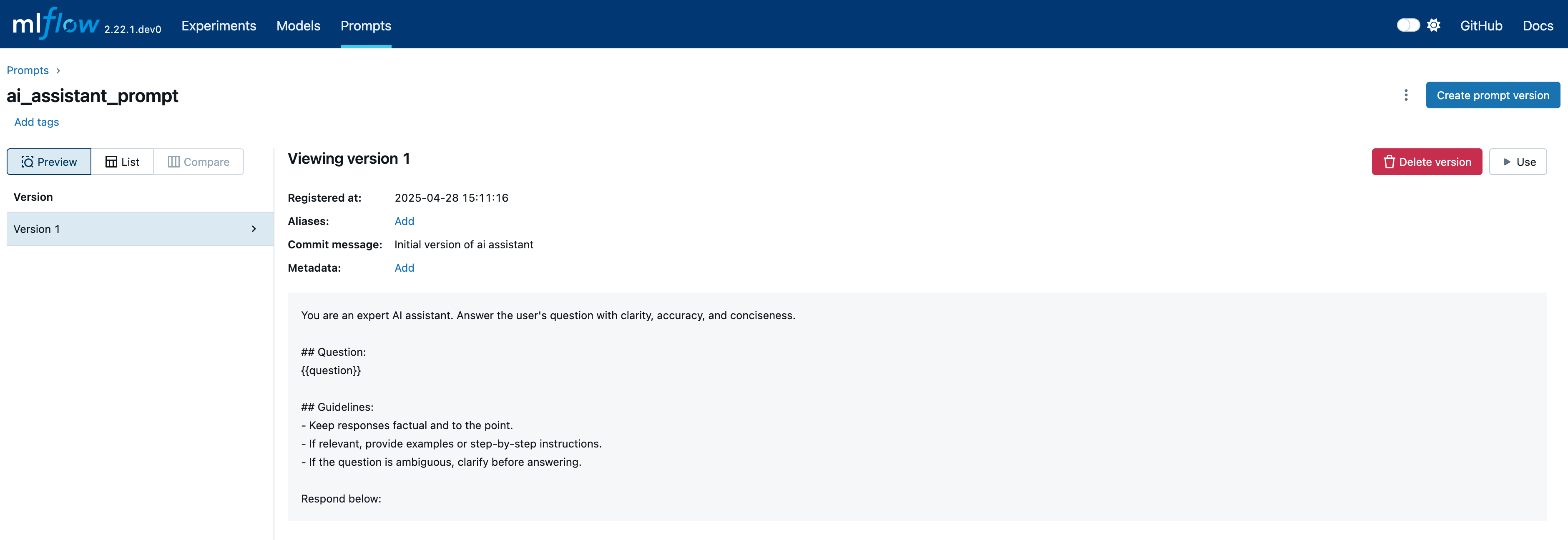
切换到 Prompts 选项卡以查看已注册的提示
向 OpenAI 发出请求
在这一步,我们设置一个活动模型来对跟踪进行分组。启用自动日志记录后,请求期间生成的所有跟踪都将链接到活动模型。
from openai import OpenAI

# set an active model for linking traces, a model named `openai_model` will be created
mlflow.set_active_model(name="openai_model")

# turn on autologging for automatic tracing
mlflow.openai.autolog()

# Initialize OpenAI client
client = OpenAI()

question = "What is MLflow?"
response = (
    client.chat.completions.create(
        messages=[{"role": "user", "content": prompt.format(question=question)}],
        model="gpt-4o-mini",
        temperature=0.1,
        max_tokens=2000,
    )
    .choices[0]
    .message.content
)

# get the active model id
active_model_id = mlflow.get_active_model_id()
print(f"Current active model id: {active_model_id}")

mlflow.search_traces(model_id=active_model_id)
#                            trace_id                                             trace  ...  assessments                        request_id
# 0  7bb4569d3d884e3e87b1d8752276a13c  Trace(trace_id=7bb4569d3d884e3e87b1d8752276a13c)  ...           []  7bb4569d3d884e3e87b1d8752276a13c
# [1 rows x 12 columns]
生成的跟踪可以在已记录模型的 Traces 选项卡中查看

使用 GenAI 指标评估响应
最后,我们使用不同的指标评估响应,并将结果记录到一次运行和当前的活动模型中。
from mlflow.metrics.genai import answer_correctness, answer_similarity, faithfulness

# ground truth result for evaluation
mlflow_ground_truth = (
    "MLflow is an open-source platform for managing "
    "the end-to-end machine learning (ML) lifecycle. It was developed by Databricks, "
    "a company that specializes in big data and machine learning solutions. MLflow is "
    "designed to address the challenges that data scientists and machine learning "
    "engineers face when developing, training, and deploying machine learning models."
)

# Define evaluation metrics
metrics = {
    "answer_similarity": answer_similarity(model="openai:/gpt-4o"),
    "answer_correctness": answer_correctness(model="openai:/gpt-4o"),
    "faithfulness": faithfulness(model="openai:/gpt-4o"),
}
# Calculate metrics based on the input, response and ground truth
# The evaluation metrics are callables that can be invoked directly
answer_similarity_score = metrics["answer_similarity"](
    predictions=response, inputs=question, targets=mlflow_ground_truth
).scores[0]
answer_correctness_score = metrics["answer_correctness"](
    predictions=response, inputs=question, targets=mlflow_ground_truth
).scores[0]
faithfulness_score = metrics["faithfulness"](
    predictions=response, inputs=question, context=mlflow_ground_truth
).scores[0]

# Start a run to represent the evaluation process
with mlflow.start_run() as run:
    # Log metrics and pass model_id to link the metrics
    mlflow.log_metrics(
        {
            "answer_similarity": answer_similarity_score,
            "answer_correctness": answer_correctness_score,
            "faithfulness": faithfulness_score,
        },
        model_id=active_model_id,
    )
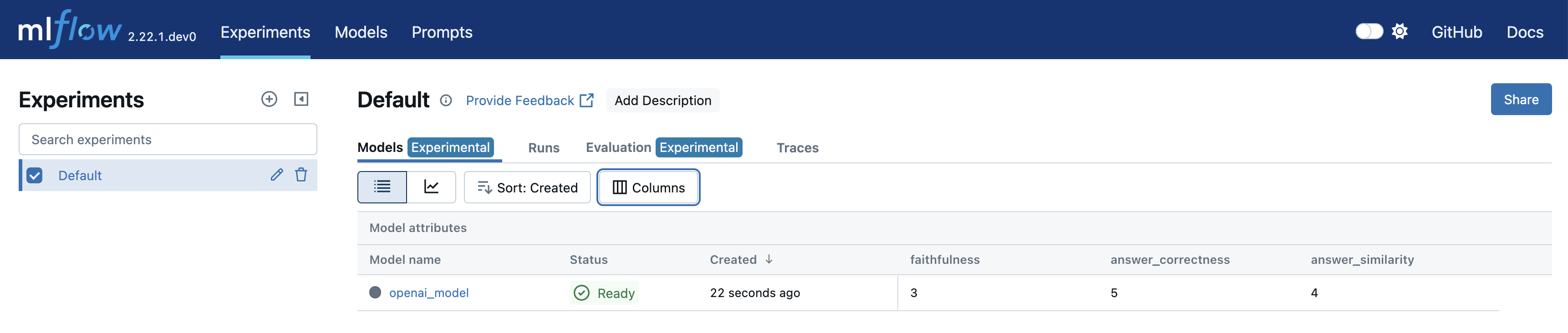
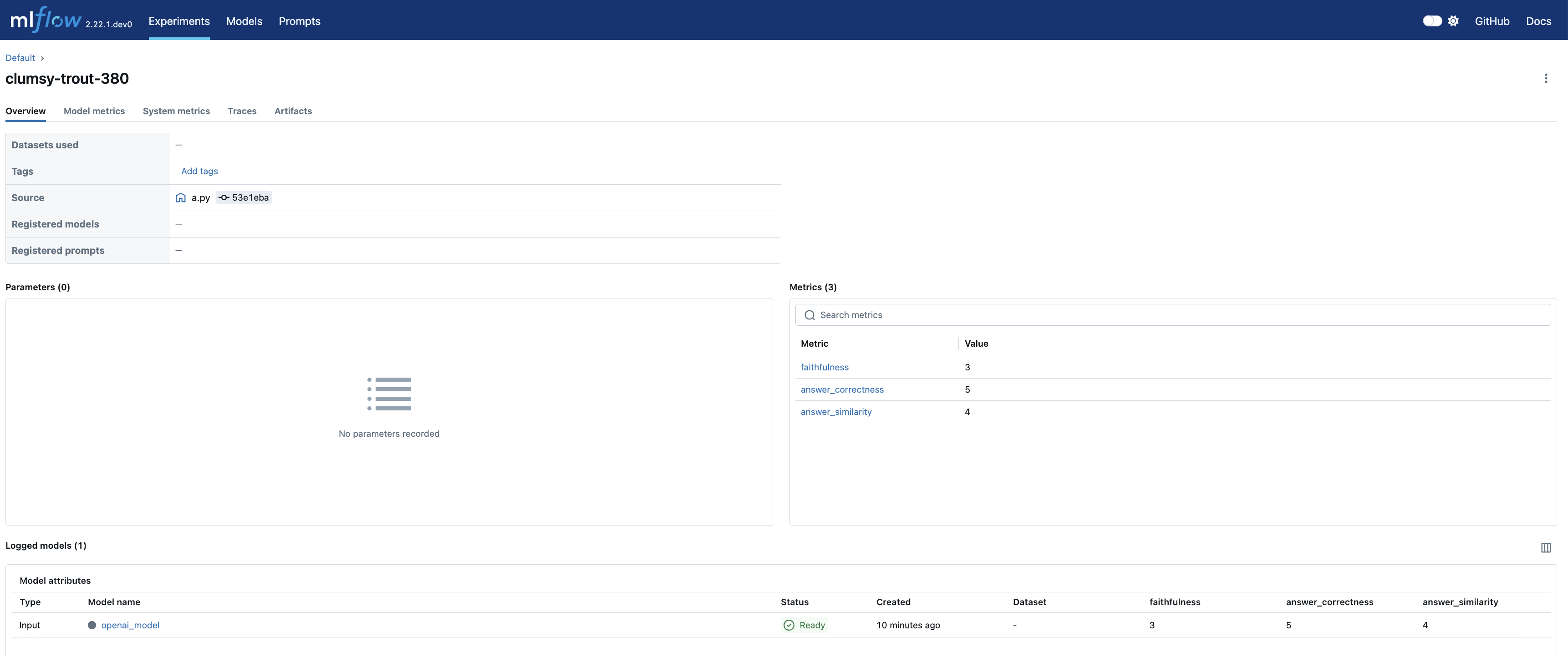
导航到实验的 Models 选项卡以查看新创建的 LoggedModel。评估指标、模型 ID、源运行、参数和其他详细信息会显示在模型详情页面上,提供了模型性能和血缘的全面概览。
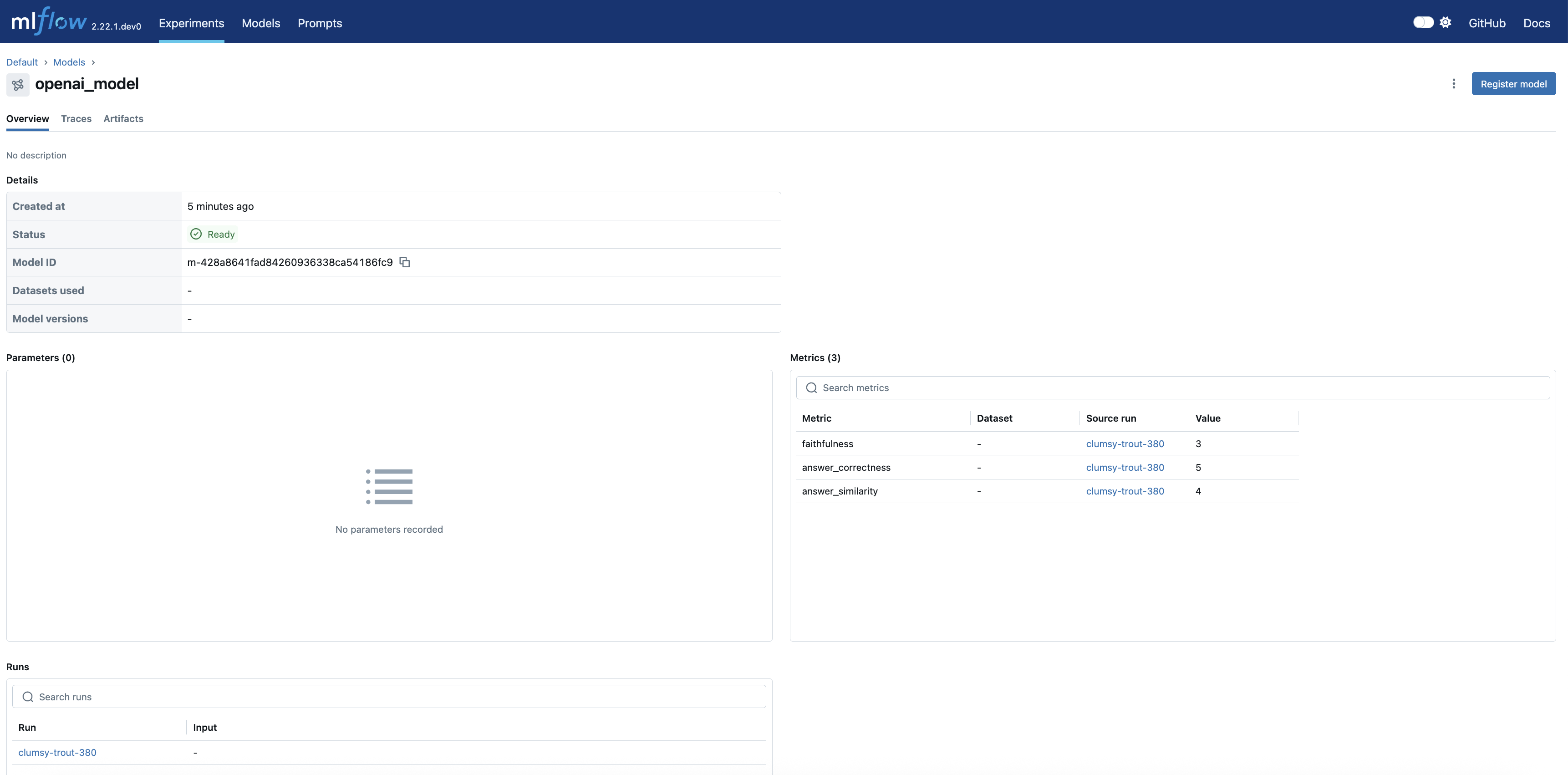
点击 source_run 会将您带到评估运行的页面,其中包含所有指标
MLflow 3 展示
探索下面的示例,了解 MLflow 3 的强大功能如何应用于各个领域。
迁移指南
MLflow 3 引入了一些关键的 API 变更,同时也移除了一些过时的功能。本指南将帮助您平滑地过渡到最新版本。
关键变更
| MLflow 2.x | MLflow 3 | |
|---|---|---|
| log_model API 用法 | 在记录模型时传递 | 在记录模型时传递 name。这使您之后可以使用此名称搜索 LoggedModels, 注意 MLflow 不再要求在记录模型之前启动一个运行(Run),因为在 MLflow 3 中,模型成为了一等公民实体。您可以直接调用 |
| 模型构件存储位置 | 模型构件作为运行构件(run artifacts)存储。 | 模型构件存储到模型构件位置(models artifacts location)。注意:这会影响 list_artifacts API 的行为。 |
已移除的功能
- MLflow Recipes
- 模型风格(Flavors):以下模型风格不再受支持
- fastai
- mleap
- AI 网关客户端 API:请改用部署 API
破坏性变更
有关 MLflow 3 中破坏性变更的完整列表,请参阅此页面。
与 MLflow 2.x 的兼容性
我们强烈建议将客户端和服务器都升级到 MLflow 3.x 以获得最佳体验。客户端和服务器版本不匹配可能导致意外行为。