提示词注册表
MLflow Prompt Registry 是一款强大的工具,可简化您生成式 AI (GenAI) 应用中的 Prompt 工程和管理。它使您能够在整个组织中对 Prompt 进行版本控制、跟踪和重用,有助于保持一致性并改进 Prompt 开发中的协作。
主要优势
版本控制
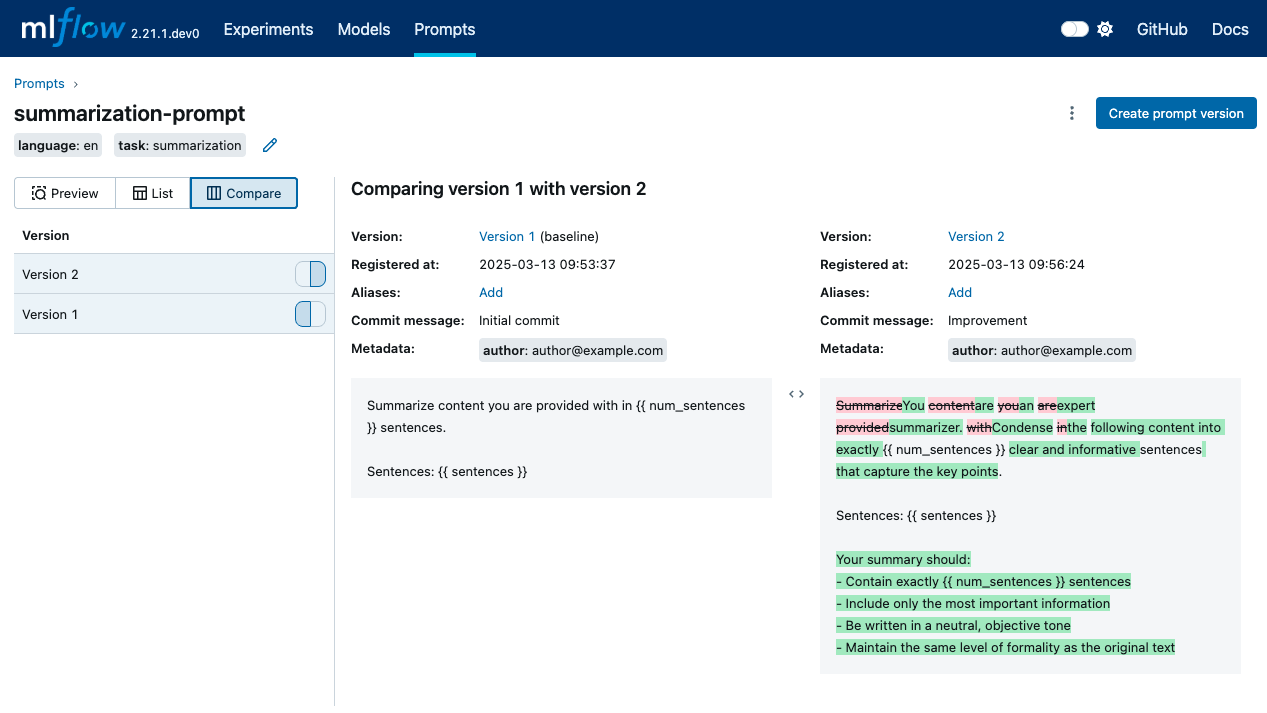
通过基于 Git 的提交版本控制和突出显示差异的并排比较来跟踪 Prompt 的演变。MLflow 中的 Prompt 版本是不可变的,为可复现性提供了强有力的保证。
别名
构建健壮且灵活的 Prompt 部署管道,允许您将 Prompt 版本与主应用程序代码隔离,并轻松执行 A/B 测试和回滚等任务。
血缘
与 MLflow 的现有功能(如模型跟踪和评估)无缝集成,实现端到端的 GenAI 生命周期管理。
协作
通过中央注册表在您的组织中共享 Prompt,使团队能够建立在彼此的工作之上。
开始使用
1. 创建 Prompt
- UI
- Python
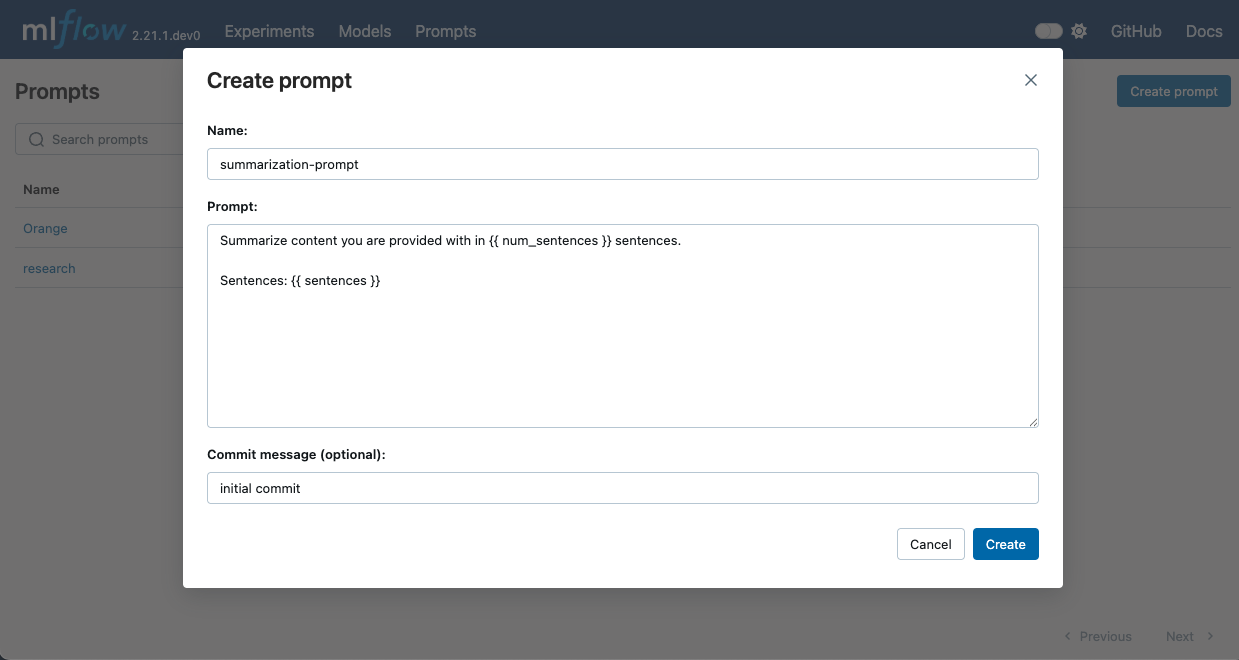
- 在终端中运行
mlflow server以启动 MLflow UI。 - 在 MLflow UI 中导航到 Prompts 选项卡。
- 点击 Create Prompt 按钮。
- 填写 Prompt 的详细信息,例如名称、Prompt 模板文本和提交消息(可选)。
- 点击 Create 注册 Prompt。
Prompt 模板文本可以包含 {{variable}} 格式的变量。在 GenAI 应用中使用 Prompt 时,这些变量可以用动态内容填充。MLflow 还提供了 to_single_brace_format() API,用于将模板转换为单花括号格式,以支持像 LangChain 或 LlamaIndex 这样需要单花括号插值的框架。
要使用 Python API 创建新的 Prompt,请使用 mlflow.genai.register_prompt() API。
import mlflow

# Use double curly braces for variables in the template
initial_template = """\
Summarize content you are provided with in {{ num_sentences }} sentences.

Sentences: {{ sentences }}
"""

# Register a new prompt
prompt = mlflow.genai.register_prompt(
    name="summarization-prompt",
    template=initial_template,
    # Optional: Provide a commit message to describe the changes
    commit_message="Initial commit",
    # Optional: Set tags applies to the prompt (across versions)
    tags={
        "author": "author@example.com",
        "task": "summarization",
        "language": "en",
    },
)

# The prompt object contains information about the registered prompt
print(f"Created prompt '{prompt.name}' (version {prompt.version})")
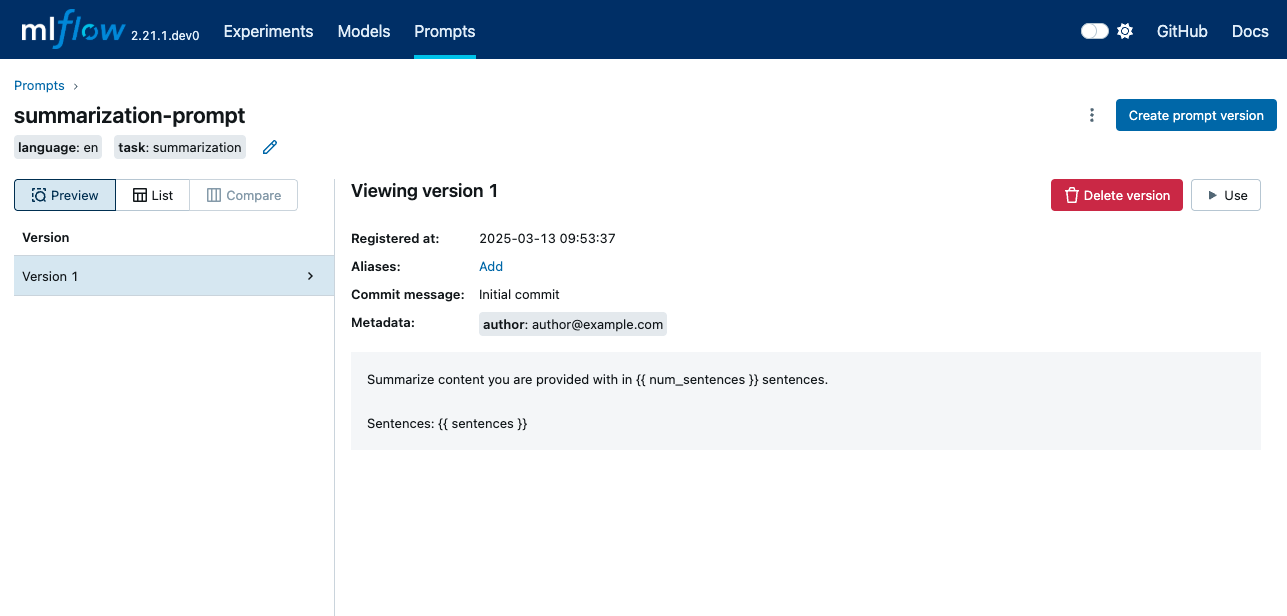
这将创建一个具有指定模板文本和元数据的新 Prompt。该 Prompt 现在可在 MLflow UI 中进行进一步管理。
2. 使用新版本更新 Prompt
- UI
- Python
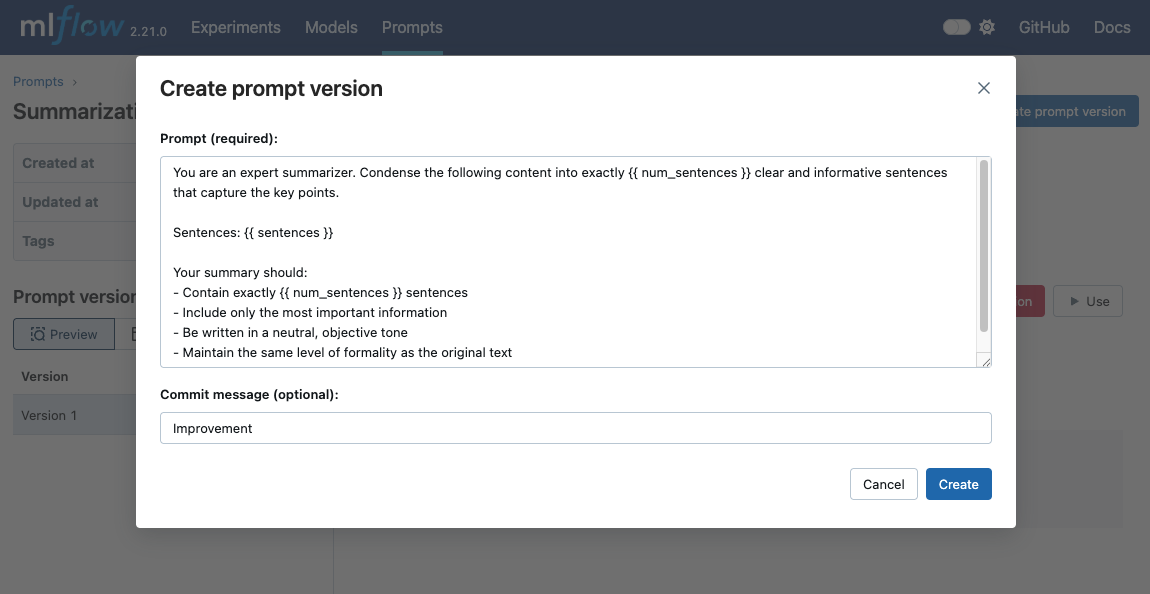
- 上一步将带您到已创建的 Prompt 页面。(如果您关闭了页面,请导航到 MLflow UI 中的 Prompts 选项卡,然后点击 Prompt 名称。)
- 点击 Create prompt Version 按钮。
- 弹出对话框已预先填充现有 Prompt 文本。随意修改 Prompt。
- 点击 Create 注册新版本。
要使用新版本更新现有 Prompt,请使用带有现有 Prompt 名称的 mlflow.genai.register_prompt() API。
import mlflow

new_template = """\
You are an expert summarizer. Condense the following content into exactly {{ num_sentences }} clear and informative sentences that capture the key points.

Sentences: {{ sentences }}

Your summary should:
- Contain exactly {{ num_sentences }} sentences
- Include only the most important information
- Be written in a neutral, objective tone
- Maintain the same level of formality as the original text
"""

# Register a new version of an existing prompt
updated_prompt = mlflow.genai.register_prompt(
    name="summarization-prompt",  # Specify the existing prompt name
    template=new_template,
    commit_message="Improvement",
    tags={
        "author": "author@example.com",
    },
)
3. 比较 Prompt 版本
一旦拥有 Prompt 的多个版本,您就可以比较它们以了解版本之间的更改。要在 MLflow UI 中比较 Prompt 版本,请在 Prompt 详细信息页面中点击 Compare 选项卡。
4. 加载和使用 Prompt
要在 GenAI 应用中使用 Prompt,您可以使用 mlflow.genai.load_prompt() API 加载它,并使用 Prompt 对象的 mlflow.entities.Prompt.format() 方法填充变量。
import mlflow
import openai

target_text = """
MLflow is an open source platform for managing the end-to-end machine learning lifecycle.
It tackles four primary functions in the ML lifecycle: Tracking experiments, packaging ML
code for reuse, managing and deploying models, and providing a central model registry.
MLflow currently offers these functions as four components: MLflow Tracking,
MLflow Projects, MLflow Models, and MLflow Registry.
"""

# Load the prompt
prompt = mlflow.genai.load_prompt("prompts:/summarization-prompt/2")

# Use the prompt with an LLM
client = openai.OpenAI()
response = client.chat.completions.create(
    messages=[
        {
            "role": "user",
            "content": prompt.format(num_sentences=1, sentences=target_text),
        }
    ],
    model="gpt-4o-mini",
)

print(response.choices[0].message.content)
5. 搜索 Prompt
您可以通过名称、标签或其他注册表字段来发现 Prompt。
import mlflow

# Fluent API: returns a flat list of all matching prompts
prompts = mlflow.genai.search_prompts(filter_string="task='summarization'")
print(f"Found {len(prompts)} prompts")

# For pagination control, use the client API:
from mlflow.tracking import MlflowClient

client = MlflowClient()
all_prompts = []
token = None
while True:
    page = client.search_prompts(
        filter_string="task='summarization'",
        max_results=50,
        page_token=token,
    )
    all_prompts.extend(page)
    token = page.token
    if not token:
        break
print(f"Total prompts across pages: {len(all_prompts)}")
Prompt 对象
Prompt 对象是 MLflow Prompt Registry 的核心实体。它代表一个可包含用于动态内容的变量的版本化模板文本。
Prompt 对象的关键属性
Name:Prompt 的唯一标识符。Template:Prompt 的内容,可以是- 包含
{{variable}}格式变量的字符串(文本 Prompt) - 代表具有 'role' 和 'content' 键的聊天消息的字典列表(聊天 Prompt)
- 包含
Version:表示 Prompt 修订版的顺序号。Commit Message:对 Prompt 版本中所做更改的描述,类似于 Git 提交消息。Tags:在 Prompt 版本上指定的用于分类和过滤的可选键值对。例如,您可以为项目名称、语言等添加适用于 Prompt 所有版本的标签。Alias:对 Prompt 的可变命名引用。例如,您可以创建一个名为production的别名来引用生产系统中使用的版本。有关更多详细信息,请参阅 Aliases。is_text_prompt:一个布尔属性,指示 Prompt 是文本 Prompt (True) 还是聊天 Prompt (False)。response_format:一个可选属性,包含预期的响应结构规范,可用于验证或组织 LLM 调用的输出。model_config:一个可选字典,包含特定于模型的配置,如模型名称、温度、最大 token 数以及其他推理参数。有关更多详细信息,请参阅 Model Configuration。
Prompt 类型
文本 Prompt
文本 Prompt 使用简单的字符串模板,变量用双花括号括起来。
text_template = "Hello {{ name }}, how are you today?"
聊天 Prompt
聊天 Prompt 使用字典列表,每个字典包含 'role' 和 'content' 键。
chat_template = [
    {"role": "system", "content": "You are a helpful {{ style }} assistant."},
    {"role": "user", "content": "{{ question }}"},
]
响应格式
response_format 属性允许您指定 LLM 调用响应的预期结构。这可以是 Pydantic 模型类或定义架构的字典。
from pydantic import BaseModel


class SummaryResponse(BaseModel):
    summary: str
    key_points: list[str]
    word_count: int


# Or as a dictionary
response_format_dict = {
    "type": "object",
    "properties": {
        "summary": {"type": "string"},
        "key_points": {"type": "array", "items": {"type": "string"}},
        "word_count": {"type": "integer"},
    },
}
管理 Prompt 和版本标签
MLflow 允许您在 Prompt 注册后修改和检查标签。标签可以应用于 Prompt 级别或单个 Prompt 版本。
import mlflow

# Prompt-level tag operations
mlflow.genai.set_prompt_tag("summarization-prompt", "language", "en")
mlflow.genai.get_prompt_tags("summarization-prompt")
mlflow.genai.delete_prompt_tag("summarization-prompt", "language")

# Prompt-version tag operations
mlflow.genai.set_prompt_version_tag("summarization-prompt", 1, "author", "alice")
mlflow.genai.load_prompt("prompts:/summarization-prompt/1").tags
mlflow.genai.delete_prompt_version_tag("summarization-prompt", 1, "author")
模型配置
MLflow Prompt Registry 允许您将特定于模型的配置与 Prompt 一起存储,确保了可复现性以及在特定 Prompt 版本使用了哪个模型和参数的清晰度。当您想
- 同时版本化 Prompt 模板和模型参数
- 与团队共享具有推荐模型设置的 Prompt
- 复现先前实验中的精确推理配置
- 为不同的 Prompt 版本维护不同的模型配置
基本用法
您可以通过在注册时传递 model_config 参数来将模型配置附加到 Prompt。
import mlflow

# Using a dictionary
model_config = {
    "model_name": "gpt-4",
    "temperature": 0.7,
    "max_tokens": 1000,
    "top_p": 0.9,
}

mlflow.genai.register_prompt(
    name="qa-prompt",
    template="Answer the following question: {{question}}",
    model_config=model_config,
    commit_message="QA prompt with model config",
)

# Load and access the model config
prompt = mlflow.genai.load_prompt("qa-prompt")
print(f"Model: {prompt.model_config['model_name']}")
print(f"Temperature: {prompt.model_config['temperature']}")
使用 PromptModelConfig 类
为了更好的类型安全和验证,您可以使用 mlflow.entities.model_registry.PromptModelConfig() 类。
import mlflow
from mlflow.entities.model_registry import PromptModelConfig

# Create a validated config object
config = PromptModelConfig(
    model_name="gpt-4-turbo",
    temperature=0.5,
    max_tokens=2000,
    top_p=0.95,
    frequency_penalty=0.2,
    presence_penalty=0.1,
    stop_sequences=["END", "\n\n"],
)

mlflow.genai.register_prompt(
    name="creative-prompt",
    template="Write a creative story about {{topic}}",
    model_config=config,
)
PromptModelConfig 类提供验证功能,可以及早发现错误。
# This will raise a ValueError
config = PromptModelConfig(temperature=-1.0)  # temperature must be non-negative

# This will raise a ValueError
config = PromptModelConfig(max_tokens=-100)  # max_tokens must be positive
支持的配置参数
以下标准参数受 PromptModelConfig 支持:
model_name(str):模型的名称或标识符(例如,“gpt-4”、“claude-3-opus”)temperature(float):用于控制随机性的采样温度(通常为 0.0-2.0)max_tokens(int):生成响应中的最大 token 数top_p(float):Nucleus 采样参数(通常为 0.0-1.0)top_k(int):Top-k 采样参数frequency_penalty(float):Token 频率惩罚(通常为 -2.0 至 2.0)presence_penalty(float):Token 存在性惩罚(通常为 -2.0 至 2.0)stop_sequences(list[str]):将导致模型停止生成的序列列表extra_params(dict):额外的提供商特定或实验性参数
提供商特定参数
您可以使用 extra_params 字段包含提供商特定的参数。
# Anthropic-specific configuration with extended thinking
# See: https://docs.anthropic.com/en/docs/build-with-claude/extended-thinking
anthropic_thinking_config = PromptModelConfig(
    model_name="claude-sonnet-4-20250514",
    max_tokens=16000,
    extra_params={
        # Enable extended thinking for complex reasoning tasks
        "thinking": {
            "type": "enabled",
            "budget_tokens": 10000,  # Max tokens for internal reasoning
        },
        # User tracking for abuse detection
        "metadata": {
            "user_id": "user-123",
        },
    },
)

# OpenAI-specific configuration with reproducibility and structured output
# See: https://platform.openai.com/docs/api-reference/chat/create
openai_config = PromptModelConfig(
    model_name="gpt-4o",
    temperature=0.7,
    max_tokens=2000,
    extra_params={
        # Seed for reproducible outputs
        "seed": 42,
        # Bias specific tokens (token_id: bias from -100 to 100)
        "logit_bias": {"50256": -100},  # Discourage <|endoftext|>
        # User identifier for abuse tracking
        "user": "user-123",
        # Service tier for priority processing
        "service_tier": "default",
    },
)
管理模型配置
模型配置是可变的,可以在 Prompt 版本创建后进行更新。这使得无需创建新的 Prompt 版本即可轻松修复错误或迭代模型参数。
设置或更新模型配置
使用 mlflow.genai.set_prompt_model_config() 为 Prompt 版本设置或更新模型配置。
import mlflow
from mlflow.entities.model_registry import PromptModelConfig

# Register a prompt without model config
mlflow.genai.register_prompt(
    name="my-prompt",
    template="Analyze: {{text}}",
)

# Later, add model config
mlflow.genai.set_prompt_model_config(
    name="my-prompt",
    version=1,
    model_config={"model_name": "gpt-4", "temperature": 0.7},
)

# Or update existing model config
mlflow.genai.set_prompt_model_config(
    name="my-prompt",
    version=1,
    model_config={"model_name": "gpt-4-turbo", "temperature": 0.8, "max_tokens": 2000},
)

# Verify the update
prompt = mlflow.genai.load_prompt("my-prompt", version=1)
print(prompt.model_config)
删除模型配置
使用 mlflow.genai.delete_prompt_model_config() 从 Prompt 版本中删除模型配置。
import mlflow

# Remove model config
mlflow.genai.delete_prompt_model_config(name="my-prompt", version=1)

# Verify removal
prompt = mlflow.genai.load_prompt("my-prompt", version=1)
assert prompt.model_config is None
重要说明
- 模型配置是特定于版本的 — 更新一个版本不会影响其他版本。
- 模型配置是可变的 — 与 Prompt 模板不同,它可以在创建后进行更改。
- 更改是即时的 — 无需创建新版本即可修复模型参数。
- 应用验证 — 更新时与创建时应用相同的验证规则。
Prompt 缓存
MLflow 会自动将加载的 Prompt 缓存到内存中,以提高性能并减少重复的 API 调用。缓存行为因您是按版本还是按别名加载 Prompt 而异。
默认缓存行为
- 基于版本的 Prompt(例如,
prompts:/summarization-prompt/1):默认情况下以无限 TTL 缓存。由于 Prompt 版本是不可变的,因此可以安全地无限期缓存。 - 基于别名的 Prompt(例如,
prompts:/summarization-prompt@latest或prompts:/summarization-prompt@production):默认情况下以60 秒 TTL 缓存。别名可以随着时间指向不同的版本,因此较短的 TTL 可确保您的应用程序能够捕获更新。
自定义缓存行为
按请求缓存控制
您可以使用 cache_ttl_seconds 参数按请求控制缓存。
import mlflow

# Custom TTL: Cache for 5 minutes
prompt = mlflow.genai.load_prompt(
    "prompts:/summarization-prompt/1", cache_ttl_seconds=300
)

# Bypass cache entirely: Always fetch from registry
prompt = mlflow.genai.load_prompt(
    "prompts:/summarization-prompt@production", cache_ttl_seconds=0
)

# Use infinite TTL even for alias-based prompts
prompt = mlflow.genai.load_prompt(
    "prompts:/summarization-prompt@latest", cache_ttl_seconds=float("inf")
)
全局缓存配置
您可以使用环境变量全局设置默认 TTL 值。
# Set alias-based prompt cache TTL to 5 minutes
export MLFLOW_ALIAS_PROMPT_CACHE_TTL_SECONDS=300

# Set version-based prompt cache TTL to 1 hour (instead of infinite)
export MLFLOW_VERSION_PROMPT_CACHE_TTL_SECONDS=3600

# Disable caching globally
export MLFLOW_ALIAS_PROMPT_CACHE_TTL_SECONDS=0
export MLFLOW_VERSION_PROMPT_CACHE_TTL_SECONDS=0
缓存失效
当您修改 Prompt 版本或别名时,缓存会自动失效,包括以下操作:
mlflow.genai.set_prompt_version_tagmlflow.genai.set_prompt_aliasmlflow.genai.delete_prompt_version_tagmlflow.genai.delete_prompt_alias
常见问题
问:如何删除 Prompt 版本?
答:您可以使用 MLflow UI 或 Python API 删除 Prompt 版本。
import mlflow

# Delete a prompt version
client = mlflow.MlflowClient()
client.delete_prompt_version("summarization-prompt", version=2)
为避免意外删除,通过 API 一次只能删除一个版本。如果您删除了 Prompt 的所有版本,该 Prompt 本身将被删除。
问:我能否更新现有 Prompt 版本的 Prompt 模板?
答:否,Prompt 版本一旦创建即不可变。要更新 Prompt,请创建具有所需更改的新版本。
问:如何动态加载 Prompt 的最新版本?
答:您可以仅传递名称来加载 Prompt 的最新版本,或者使用 @latest 别名。这是保留的别名名称,MLflow 将自动查找 Prompt 的最新可用版本。
prompt = mlflow.genai.load_prompt("summarization-prompt")
# or
prompt = mlflow.genai.load_prompt("prompts:/summarization-prompt@latest")
问:我可以使用 Prompt 模板与 LangChain 或 LlamaIndex 等框架一起使用吗?
答:是的,您可以从 MLflow 加载 Prompt 并将其与任何框架一起使用。例如,以下示例演示了如何将 MLflow 中注册的 Prompt 与 LangChain 一起使用。有关更多详细信息,请参阅 Logging Prompts with LangChain。
import mlflow
from langchain.prompts import PromptTemplate

# Load prompt from MLflow
prompt = mlflow.genai.load_prompt("question_answering")

# Convert the prompt to single brace format for LangChain (MLflow uses double braces),
# using the `to_single_brace_format` method.
langchain_prompt = PromptTemplate.from_template(prompt.to_single_brace_format())
print(langchain_prompt.input_variables)
# Output: ['num_sentences', 'sentences']
问:Prompt Registry 是否与 Prompt Engineering UI 集成?
答:Prompt Registry 和 Prompt Engineering UI 之间的直接集成即将推出。在此期间,您可以在 Prompt Engineering UI 中迭代 Prompt 模板,并通过手动复制 Prompt 模板将其注册到 Prompt Registry 中。