为新模型自动重写提示 (实验性)
当迁移到新的语言模型时,您经常会发现精心设计的提示在新模型上的效果不佳。MLflow 的 mlflow.genai.optimize_prompts() API 可以帮助您 **自动重写提示**,以便在使用现有应用程序的输出来作为训练数据时,在切换模型时保持输出质量。
主要优势
- 模型迁移:在语言模型之间无缝切换,同时保持输出一致性
- 自动优化:根据现有数据自动重写提示
- 无需真实标签:如果基于现有输出来优化提示,则无需人工标注
- 可追溯:利用 MLflow 追踪来理解提示的使用模式
- 灵活:适用于任何使用 MLflow Prompt Registry 的函数
版本要求
optimize_prompts API 要求 **MLflow >= 3.5.0**。

示例:简单提示 → 优化后的提示
优化前
text
Classify the sentiment. Answer 'positive'
or 'negative' or 'neutral'.

Text: {{text}}
优化后
text
Classify the sentiment of the provided text.
Your response must be one of the following:
- 'positive'
- 'negative'
- 'neutral'

Ensure your response is lowercase and contains
only one of these three words.

Text: {{text}}

Guidelines:
- 'positive': The text expresses satisfaction,
  happiness, or approval
- 'negative': The text expresses dissatisfaction,
  anger, or disapproval
- 'neutral': The text is factual or balanced
  without strong emotion

Your response must match this exact format with
no additional explanation.
何时使用提示重写
此方法最适合以下情况:
- 降级模型:从
gpt-5→gpt-4o-mini迁移以降低成本 - 切换提供商:从 OpenAI 切换到 Anthropic 或反之
- 性能优化:迁移到更快的模型,同时保持质量
- 您已有输出:当前系统已产生良好结果
快速入门:模型迁移工作流
以下是从 gpt-5 迁移到 gpt-4o-mini 以保持输出一致性的完整示例
步骤 1:捕获原始模型的输出
首先,使用 MLflow 追踪收集现有模型的输出
python
import mlflow
import openai
from mlflow.genai.optimize import GepaPromptOptimizer
from mlflow.genai.datasets import create_dataset
from mlflow.genai.scorers import Equivalence

# Register your current prompt
prompt = mlflow.genai.register_prompt(
    name="sentiment",
    template="""Classify the sentiment. Answer 'positive' or 'negative' or 'neutral'.
Text: {{text}}""",
)


# Define your prediction function using the original model and base prompt
@mlflow.trace
def predict_fn_base_model(text: str) -> str:
    completion = openai.OpenAI().chat.completions.create(
        model="gpt-5",  # Original model
        messages=[{"role": "user", "content": prompt.format(text=text)}],
    )
    return completion.choices[0].message.content.lower()


# Example inputs - each record contains an "inputs" dict with the function's input parameters
inputs = [
    {
        "inputs": {
            "text": "This movie was absolutely fantastic! I loved every minute of it."
        }
    },
    {"inputs": {"text": "The service was terrible and the food arrived cold."}},
    {"inputs": {"text": "It was okay, nothing special but not bad either."}},
    {
        "inputs": {
            "text": "I'm so disappointed with this purchase. Complete waste of money."
        }
    },
    {"inputs": {"text": "Best experience ever! Highly recommend to everyone."}},
    {"inputs": {"text": "The product works as described. No complaints."}},
    {"inputs": {"text": "I can't believe how amazing this turned out to be!"}},
    {"inputs": {"text": "Worst customer support I've ever dealt with."}},
    {"inputs": {"text": "It's fine for the price. Gets the job done."}},
    {"inputs": {"text": "This exceeded all my expectations. Truly wonderful!"}},
]

# Collect outputs from original model
with mlflow.start_run() as run:
    for record in inputs:
        predict_fn_base_model(**record["inputs"])
步骤 2:从追踪创建训练数据集
将追踪的输出转换为训练数据集
python
# Create dataset
dataset = create_dataset(name="sentiment_migration_dataset")

# Retrieve traces from the run
traces = mlflow.search_traces(return_type="list", run_id=run.info.run_id)

# Merge traces into dataset
dataset.merge_records(traces)
这将自动创建一个数据集,其中包含
inputs:输入变量 (此处为text)outputs:原始模型 (gpt-5) 的实际输出
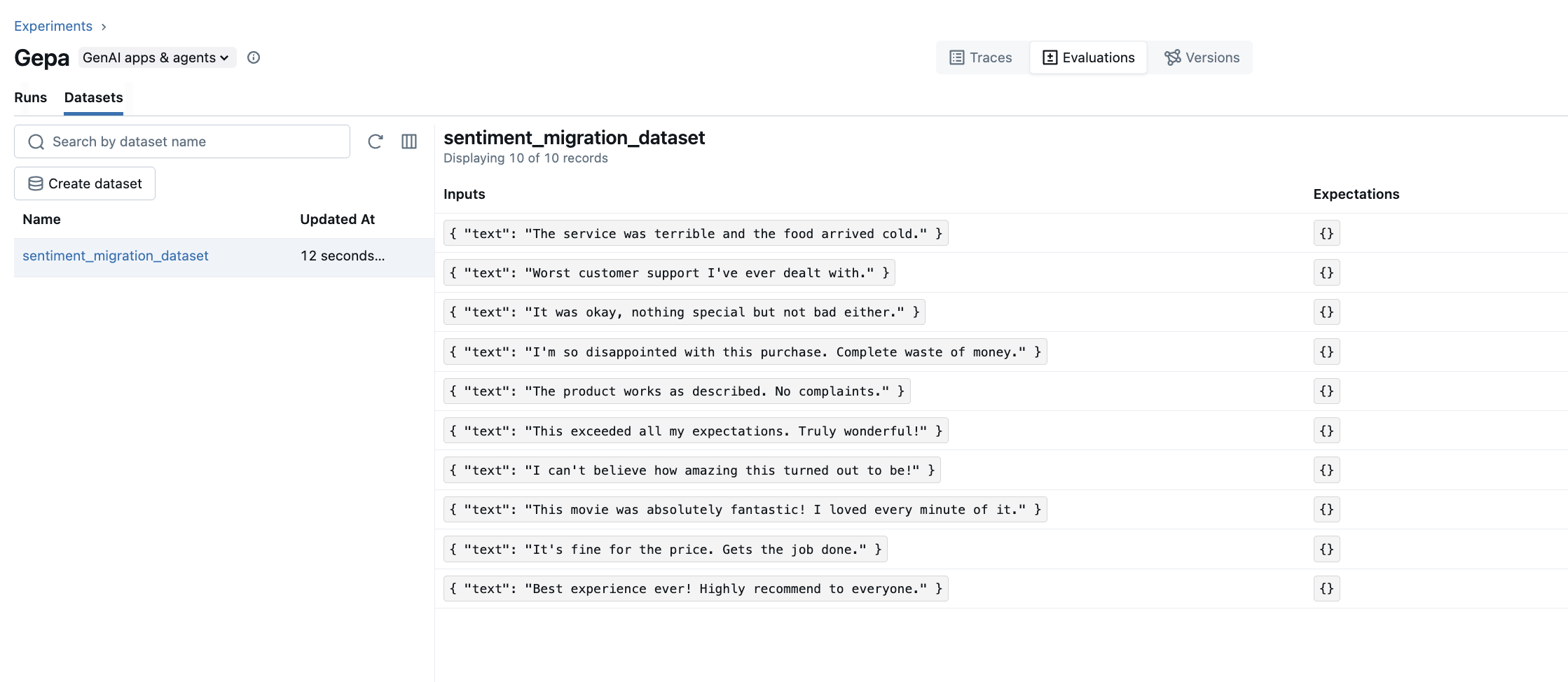
您可以通过导航到以下位置在 MLflow UI 中查看创建的数据集:
- Experiments 选项卡 → 选择您的实验
- Evaluations 选项卡 → 在左侧边栏中选择 "Datasets" 选项卡
- Dataset 选项卡 → 检查输入/输出对
数据集视图显示了从追踪中收集的所有输入和输出,方便在优化前验证训练数据。
步骤 3:切换模型
将您的 LM 切换到目标模型
python
# Define function using target model
@mlflow.trace
def predict_fn(text: str) -> str:
    completion = openai.OpenAI().chat.completions.create(
        model="gpt-4o-mini",  # Target model
        messages=[{"role": "user", "content": prompt.format(text=text)}],
        temperature=0,
    )
    return completion.choices[0].message.content.lower()
您可能会注意到目标模型在格式遵循方面不如原始模型一致。
步骤 4:为目标模型优化提示
使用收集的数据集为目标模型优化提示
python
# Optimize prompts for the target model
result = mlflow.genai.optimize_prompts(
    predict_fn=predict_fn,
    train_data=dataset,
    prompt_uris=[prompt.uri],
    optimizer=GepaPromptOptimizer(reflection_model="openai:/gpt-5"),
    scorers=[Equivalence(model="openai:/gpt-5")],
)

# View the optimized prompt
optimized_prompt = result.optimized_prompts[0]
print(f"Optimized template: {optimized_prompt.template}")
优化后的提示将包含额外的说明,以帮助 gpt-4o-mini 匹配 gpt-5 的行为
text
Optimized template:
Classify the sentiment of the provided text. Your response must be one of the following:
- 'positive'
- 'negative'
- 'neutral'

Ensure your response is lowercase and contains only one of these three words.

Text: {{text}}

Guidelines:
- 'positive': The text expresses satisfaction, happiness, or approval
- 'negative': The text expresses dissatisfaction, anger, or disapproval
- 'neutral': The text is factual or balanced without strong emotion

Your response must match this exact format with no additional explanation.
步骤 5:使用优化后的提示
在应用程序中部署优化后的提示
python
# Load the optimized prompt
optimized = mlflow.genai.load_prompt(optimized_prompt.uri)


# Use in production
@mlflow.trace
def predict_fn_optimized(text: str) -> str:
    completion = openai.OpenAI().chat.completions.create(
        model="gpt-4o-mini",
        messages=[{"role": "user", "content": optimized.format(text=text)}],
        temperature=0,
    )
    return completion.choices[0].message.content.lower()


# Test with new inputs
test_result = predict_fn_optimized("This product is amazing!")
print(test_result)  # Output: positive
最佳实践
1. 收集足够的数据
为获得最佳效果,请收集至少 20-50 个多样化示例的输出
python
# ✅ Good: Diverse examples
inputs = [
    {"inputs": {"text": "Great product!"}},
    {
        "inputs": {
            "text": "The delivery was delayed by three days and the packaging was damaged. The product itself works fine but the experience was disappointing overall."
        }
    },
    {
        "inputs": {
            "text": "It meets the basic requirements. Nothing more, nothing less."
        }
    },
    # ... more varied examples
]

# ❌ Poor: Too few, too similar
inputs = [
    {"inputs": {"text": "Good"}},
    {"inputs": {"text": "Bad"}},
]
2. 使用代表性示例
包含边缘情况和具有挑战性的输入
python
inputs = [
    {"inputs": {"text": "Absolutely fantastic!"}},  # Clear positive
    {"inputs": {"text": "It's not bad, I guess."}},  # Ambiguous
    {"inputs": {"text": "The food was good but service terrible."}},  # Mixed sentiment
]
3. 验证结果
在生产部署之前,请始终使用 mlflow.genai.evaluate() 测试优化后的提示。
python
# Evaluate optimized prompt
results = mlflow.genai.evaluate(
    data=test_dataset,
    predict_fn=predict_fn_optimized,
    scorers=[accuracy_scorer, format_scorer],
)

print(f"Accuracy: {results.metrics['accuracy']}")
print(f"Format compliance: {results.metrics['format_scorer']}")