Tracing AutoGen
AutoGen AgentChat 是一个开源框架,用于构建单智能体和多智能体对话应用。
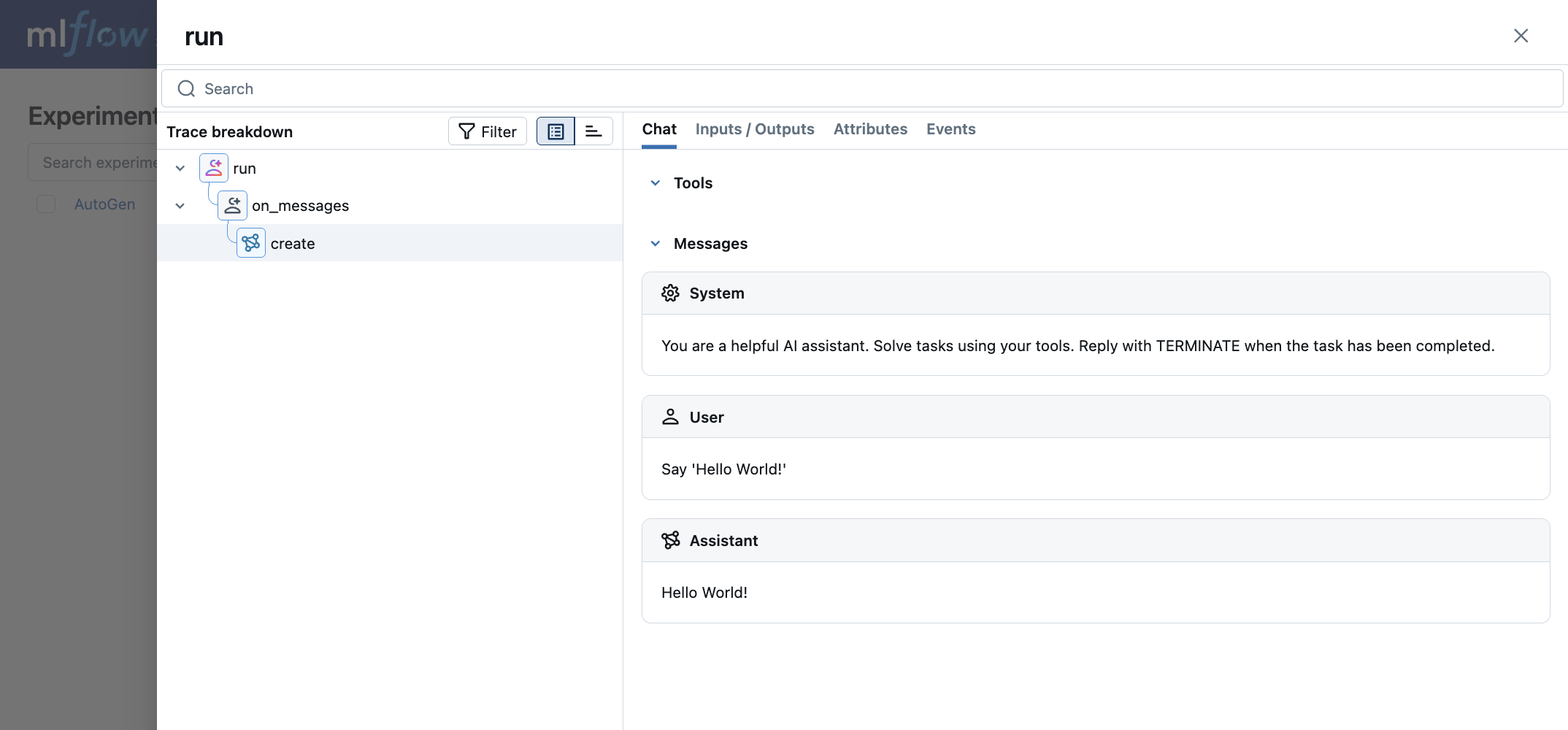
MLflow Tracing 为 AutoGen AgentChat 提供了自动跟踪功能。通过调用 mlflow.autogen.autolog() 函数启用 AutoGen 的自动跟踪,MLflow 将捕获嵌套跟踪并将它们记录到活动 MLflow Experiment 中,以进行智能体执行。
import mlflow

mlflow.autogen.autolog()
请注意,mlflow.autogen.autolog() 应在导入要跟踪的 AutoGen 类之后调用。ChatCompletionClient 的子类,例如 OpenAIChatCompletionClient 或 AnthropicChatCompletionClient,以及 BaseChatAgent 的子类,例如 AssistantAgent 或 CodeExecutorAgent,应在调用 mlflow.autogen.autolog() 之前导入。另请注意,此集成适用于 AutoGen 0.4.9 或更高版本。如果您使用的是 AutoGen 0.2,请使用 AG2 集成。
MLflow 捕获以下有关 AutoGen 智能体的信息
- 传递给智能体的消息,包括图像
- 智能体的响应
- 每个智能体进行的 LLM 和工具调用
- 延迟
- 如果抛出任何异常
支持的 API
MLflow 支持对以下 AutoGen API 进行自动跟踪。它不支持对异步生成器的跟踪。异步流式 API,如 run_stream 或 on_messages_stream,不被跟踪。
ChatCompletionClient.createBaseChatAgent.runBaseChatAgent.on_messages
基本示例
import os

# Imports of autogen classes should happen before calling autolog.
from autogen_agentchat.agents import AssistantAgent
from autogen_ext.models.openai import OpenAIChatCompletionClient

import mlflow

# Turn on auto tracing for AutoGen
mlflow.autogen.autolog()

# Optional: Set a tracking URI and an experiment
mlflow.set_tracking_uri("https://:5000")
mlflow.set_experiment("AutoGen")

model_client = OpenAIChatCompletionClient(
    model="gpt-4.1-nano",
    # api_key="YOUR_API_KEY",
)

agent = AssistantAgent(
    name="assistant",
    model_client=model_client,
    system_message="You are a helpful assistant.",
)

result = await agent.run(task="Say 'Hello World!'")
print(result)
Tool Agent
import os

# Imports of autogen classes should happen before calling autolog.
from autogen_agentchat.agents import AssistantAgent
from autogen_ext.models.openai import OpenAIChatCompletionClient

import mlflow

# Turn on auto tracing for AutoGen
mlflow.autogen.autolog()

# Optional: Set a tracking URI and an experiment
mlflow.set_tracking_uri("https://:5000")
mlflow.set_experiment("AutoGen")

model_client = OpenAIChatCompletionClient(
    model="gpt-4.1-nano",
    # api_key="YOUR_API_KEY",
)


def add(a: int, b: int) -> int:
    """add two numbers"""
    return a + b


agent = AssistantAgent(
    name="assistant",
    model_client=model_client,
    system_message="You are a helpful assistant.",
    tools=[add],
)

await agent.run(task="1+1")
Token 用量
MLflow >= 3.2.0 支持 AutoGen 的 token 用量跟踪。每个 LLM 调用的 token 用量将记录在 mlflow.chat.tokenUsage 属性中。整个跟踪过程的总 token 用量可在跟踪信息对象的 token_usage 字段中找到。
import json
import mlflow

mlflow.autogen.autolog()

# Run the tool calling agent defined in the previous section
await agent.run(task="1+1")

# Get the trace object just created
last_trace_id = mlflow.get_last_active_trace_id()
trace = mlflow.get_trace(trace_id=last_trace_id)

# Print the token usage
total_usage = trace.info.token_usage
print("== Total token usage: ==")
print(f"  Input tokens: {total_usage['input_tokens']}")
print(f"  Output tokens: {total_usage['output_tokens']}")
print(f"  Total tokens: {total_usage['total_tokens']}")

# Print the token usage for each LLM call
print("\n== Detailed usage for each LLM call: ==")
for span in trace.data.spans:
    if usage := span.get_attribute("mlflow.chat.tokenUsage"):
        print(f"{span.name}:")
        print(f"  Input tokens: {usage['input_tokens']}")
        print(f"  Output tokens: {usage['output_tokens']}")
        print(f"  Total tokens: {usage['total_tokens']}")
== Total token usage: ==
  Input tokens: 65
  Output tokens: 17
  Total tokens: 82

== Detailed usage for each LLM call: ==
create:
  Input tokens: 65
  Output tokens: 17
  Total tokens: 82
支持的 API
MLflow 支持对以下 AutoGen API 进行自动 token 用量跟踪。它不支持对异步生成器的 token 用量跟踪。异步流式 API,如 run_stream 或 on_messages_stream,不被跟踪。
ChatCompletionClient.createBaseChatAgent.runBaseChatAgent.on_messages
禁用自动跟踪
可以通过全局调用 mlflow.autogen.autolog(disable=True) 或 mlflow.autolog(disable=True) 来禁用 AutoGen 的自动跟踪。