Tracing FireworksAI
FireworksAI 是一个开源 AI 的推理和定制引擎。它提供对最新 SOTA OSS 模型的零日访问,并允许开发人员构建闪电般的 AI 应用程序。
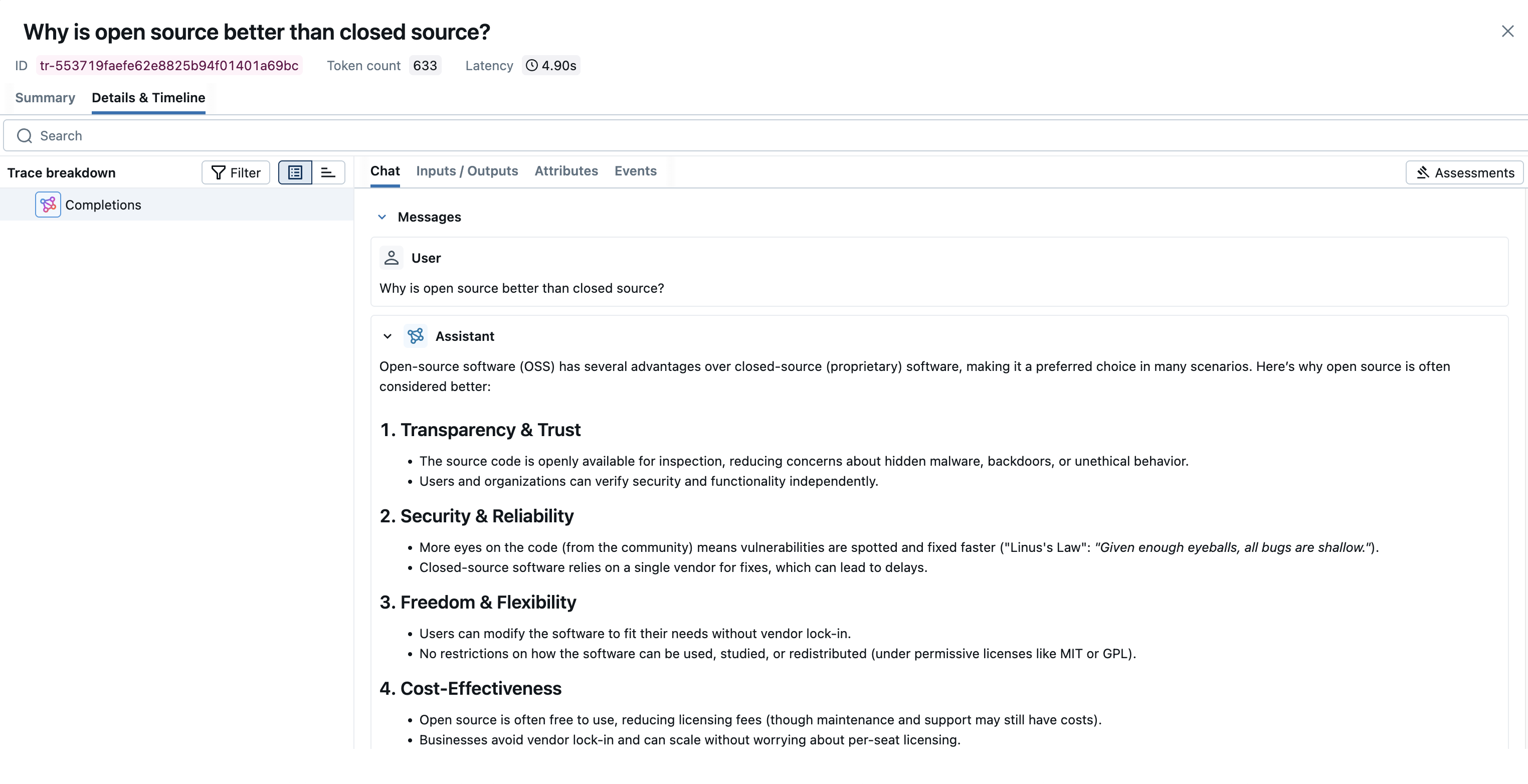
MLflow Tracing 通过 OpenAI SDK 兼容性为 FireworksAI 提供自动跟踪功能。FireworksAI 兼容 OpenAI SDK,您可以使用 mlflow.openai.autolog() 函数来启用自动跟踪。MLflow 将捕获 LLM 调用的跟踪信息并将其记录到活动的 MLflow 实验中。
MLflow 会自动捕获 FireworksAI 调用的以下信息
- 提示和完成响应
- 延迟
- 模型名称
- 其他元数据,例如
temperature、max_completion_tokens(如果指定) - Tool Use(如果响应中返回)
- 如果抛出任何异常
支持的 API
由于 FireworksAI 兼容 OpenAI SDK,MLflow 的 OpenAI 集成支持的所有 API 都可以与 FireworksAI 无缝配合。有关 FireworksAI 上可用模型的列表,请参阅 模型库。
| Normal | Tool Use | Structured Outputs | 流式传输 | 异步 |
|---|---|---|---|---|
| ✅ | ✅ | ✅ | ✅ | ✅ |
快速入门
import mlflow
import openai
import os

# Enable auto-tracing
mlflow.openai.autolog()

# Optional: Set a tracking URI and an experiment
mlflow.set_tracking_uri("https://:5000")
mlflow.set_experiment("FireworksAI")

# Create an OpenAI client configured for FireworksAI
openai_client = openai.OpenAI(
    base_url="https://api.fireworks.ai/inference/v1",
    api_key=os.getenv("FIREWORKS_API_KEY"),
)

# Use the client as usual - traces will be automatically captured
response = openai_client.chat.completions.create(
    model="accounts/fireworks/models/deepseek-v3-0324",  # For other models see: https://fireworks.ai/models
    messages=[
        {"role": "user", "content": "Why is open source better than closed source?"}
    ],
)
Chat Completion API 示例
- 基本示例
- 流式传输
- 异步
- Tool Use
import openai
import mlflow
import os

# Enable auto-tracing
mlflow.openai.autolog()

# Optional: Set a tracking URI and an experiment
# If running locally you can start a server with:  `mlflow server --host 127.0.0.1 --port 5000`
mlflow.set_tracking_uri("http://127.0.0.1:5000")
mlflow.set_experiment("FireworksAI")

# Configure OpenAI client for FireworksAI
openai_client = openai.OpenAI(
    base_url="https://api.fireworks.ai/inference/v1",
    api_key=os.getenv("FIREWORKS_API_KEY"),
)

messages = [
    {
        "role": "user",
        "content": "What is the capital of France?",
    }
]

# To use different models check out the model library at: https://fireworks.ai/models
response = openai_client.chat.completions.create(
    model="accounts/fireworks/models/deepseek-v3-0324",
    messages=messages,
    max_completion_tokens=100,
)
MLflow Tracing 支持通过 OpenAI SDK 对 FireworksAI 端点的流式 API 输出进行跟踪。通过相同的自动跟踪设置,MLflow 会自动跟踪流式响应并在 span UI 中渲染连接的输出。响应流中的实际块也可以在 Event 选项卡中找到。
import openai
import mlflow
import os

# Enable trace logging
mlflow.openai.autolog()

client = openai.OpenAI(
    base_url="https://api.fireworks.ai/inference/v1",
    api_key=os.getenv("FIREWORKS_API_KEY"),
)

stream = client.chat.completions.create(
    model="accounts/fireworks/models/deepseek-v3-0324",
    messages=[
        {"role": "user", "content": "How fast would a glass of water freeze on Titan?"}
    ],
    stream=True,  # Enable streaming response
)
for chunk in stream:
    print(chunk.choices[0].delta.content or "", end="")
MLflow Tracing 支持通过 OpenAI SDK 对 FireworksAI 的异步 API 返回进行跟踪。用法与同步 API 相同。
import openai
import mlflow
import os

# Enable trace logging
mlflow.openai.autolog()

client = openai.AsyncOpenAI(
    base_url="https://api.fireworks.ai/inference/v1",
    api_key=os.getenv("FIREWORKS_API_KEY"),
)

response = await client.chat.completions.create(
    model="accounts/fireworks/models/deepseek-v3-0324",
    messages=[{"role": "user", "content": "What is the best open source LLM?"}],
    # Async streaming is also supported
    # stream=True
)
MLflow Tracing 会自动捕获来自 FireworksAI 模型的工具使用响应。响应中的函数指令将在跟踪 UI 中突出显示。此外,您可以使用 @mlflow.trace 装饰器注解工具函数,为工具执行创建 span。
以下示例使用 FireworksAI 和 MLflow Tracing 实现了一个简单的工具使用代理
import json
from openai import OpenAI
import mlflow
from mlflow.entities import SpanType
import os

client = OpenAI(
    base_url="https://api.fireworks.ai/inference/v1",
    api_key=os.getenv("FIREWORKS_API_KEY"),
)


# Define the tool function. Decorate it with `@mlflow.trace` to create a span for its execution.
@mlflow.trace(span_type=SpanType.TOOL)
def get_weather(city: str) -> str:
    if city == "Tokyo":
        return "sunny"
    elif city == "Paris":
        return "rainy"
    return "unknown"


tools = [
    {
        "type": "function",
        "function": {
            "name": "get_weather",
            "parameters": {
                "type": "object",
                "properties": {"city": {"type": "string"}},
            },
        },
    }
]

_tool_functions = {"get_weather": get_weather}


# Define a simple tool calling agent
@mlflow.trace(span_type=SpanType.AGENT)
def run_tool_agent(question: str):
    messages = [{"role": "user", "content": question}]

    # Invoke the model with the given question and available tools
    response = client.chat.completions.create(
        model="accounts/fireworks/models/gpt-oss-20b",
        messages=messages,
        tools=tools,
    )
    ai_msg = response.choices[0].message
    messages.append(ai_msg)

    # If the model requests tool call(s), invoke the function with the specified arguments
    if tool_calls := ai_msg.tool_calls:
        for tool_call in tool_calls:
            function_name = tool_call.function.name
            if tool_func := _tool_functions.get(function_name):
                args = json.loads(tool_call.function.arguments)
                tool_result = tool_func(**args)
            else:
                raise RuntimeError("An invalid tool is returned from the assistant!")

            messages.append(
                {
                    "role": "tool",
                    "tool_call_id": tool_call.id,
                    "content": tool_result,
                }
            )

        # Send the tool results to the model and get a new response
        response = client.chat.completions.create(
            model="accounts/fireworks/models/llama-v3p1-8b-instruct", messages=messages
        )

    return response.choices[0].message.content


# Run the tool calling agent
question = "What's the weather like in Paris today?"
answer = run_tool_agent(question)
Token Usage
MLflow 支持对 FireworksAI 的 token 使用情况进行跟踪。每次 LLM 调用的 token 使用情况将记录在 mlflow.chat.tokenUsage 属性中。整个跟踪过程的总 token 使用情况将在跟踪信息对象的 token_usage 字段中提供。
import json
import mlflow

mlflow.openai.autolog()

# Run the tool calling agent defined in the previous section
question = "What's the weather like in Paris today?"
answer = run_tool_agent(question)

# Get the trace object just created
last_trace_id = mlflow.get_last_active_trace_id()
trace = mlflow.get_trace(trace_id=last_trace_id)

# Print the token usage
total_usage = trace.info.token_usage
print("== Total token usage: ==")
print(f"  Input tokens: {total_usage['input_tokens']}")
print(f"  Output tokens: {total_usage['output_tokens']}")
print(f"  Total tokens: {total_usage['total_tokens']}")

# Print the token usage for each LLM call
print("\n== Detailed usage for each LLM call: ==")
for span in trace.data.spans:
    if usage := span.get_attribute("mlflow.chat.tokenUsage"):
        print(f"{span.name}:")
        print(f"  Input tokens: {usage['input_tokens']}")
        print(f"  Output tokens: {usage['output_tokens']}")
        print(f"  Total tokens: {usage['total_tokens']}")
== Total token usage: ==
  Input tokens: 20
  Output tokens: 283
  Total tokens: 303

== Detailed usage for each LLM call: ==
Completions:
  Input tokens: 20
  Output tokens: 283
  Total tokens: 303
禁用自动跟踪
可以通过调用 mlflow.openai.autolog(disable=True) 或 mlflow.autolog(disable=True) 来全局禁用 FireworksAI 的自动跟踪。