追踪 Microsoft Agent Framework
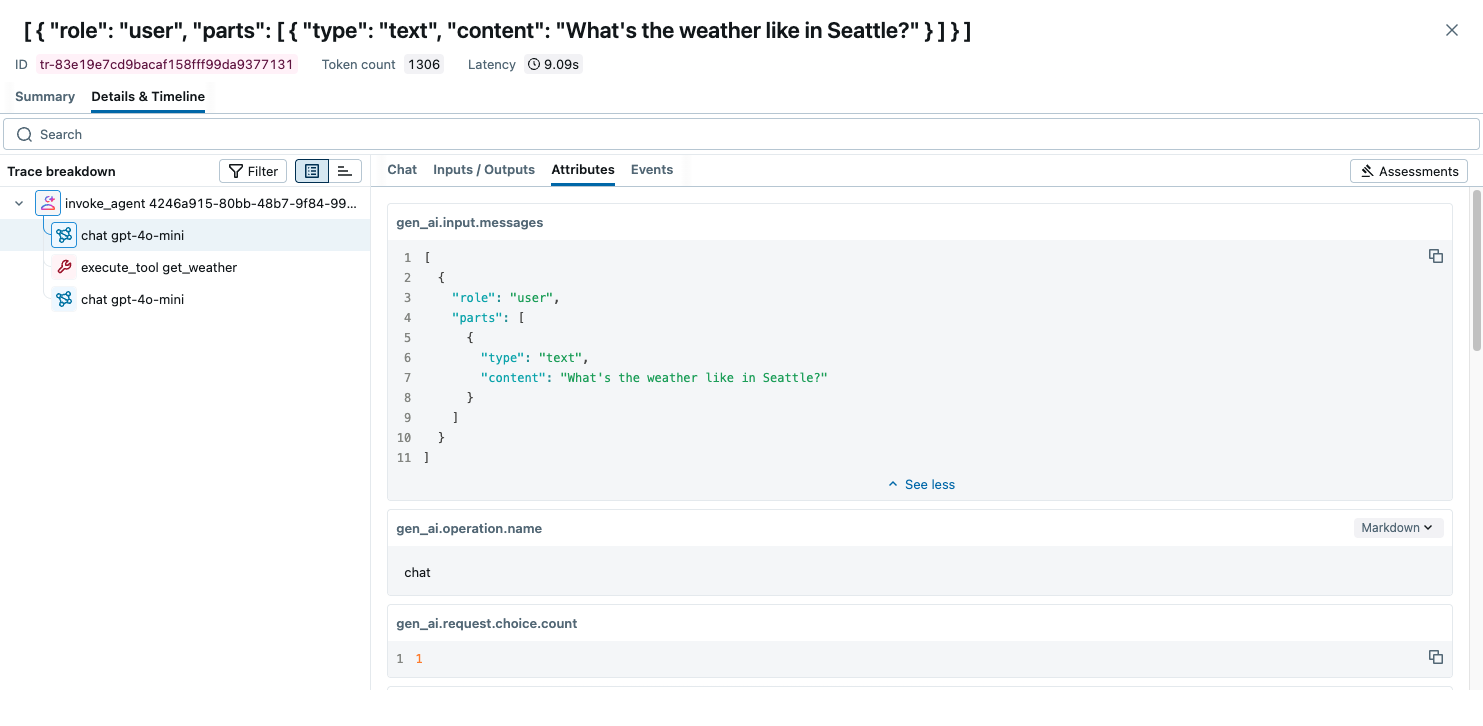
MLflow Tracing 为 Microsoft Agent Framework 提供自动追踪功能,Microsoft Agent Framework 是由 Microsoft 开发的一个灵活且模块化的 AI 代理框架。MLflow 通过 OpenTelemetry 集成支持对 Microsoft Agent Framework 的追踪。
第 1 步:安装库
bash
pip install mlflow>=3.6.0 agent-framework opentelemetry-exporter-otlp-proto-http
步骤 2:启动 MLflow Tracking Server
使用基于 SQL 的后端存储启动 MLflow Tracking Server
bash
mlflow server --backend-store-uri sqlite:///mlflow.db --port 5000
本示例使用 SQLite 作为后端存储。要使用其他类型的 SQL 数据库(如 PostgreSQL、MySQL 和 MSSQL),请按照 后端存储文档 中的说明更改存储 URI。文件型后端存储不支持 OpenTelemetry 摄取。
步骤 3:配置 OpenTelemetry
配置 OpenTelemetry 追踪器,将追踪导出到 MLflow Tracking Server 端点。
- 将端点设置为 MLflow Tracking Server 的
/v1/traces端点 (OTLP)。 - 将
x-mlflow-experiment-id头部设置为 MLflow 实验 ID。如果您没有实验 ID,请通过 Python SDK 或 MLflow UI 创建。
python
from agent_framework.observability import setup_observability
from opentelemetry.exporter.otlp.proto.http.trace_exporter import OTLPSpanExporter

# Create the OTLP span exporter with endpoint and headers
MLFLOW_TRACKING_URI = "https://:5000"
MLFLOW_EXPERIMENT_ID = "1234567890"
OTEL_EXPORTER_OTLP_ENDPOINT = f"{MLFLOW_TRACKING_URI}/v1/traces"
OTEL_EXPORTER_OTLP_HEADERS = {"x-mlflow-experiment-id": MLFLOW_EXPERIMENT_ID}

exporter = OTLPSpanExporter(
    endpoint=OTEL_EXPORTER_OTLP_ENDPOINT, headers=OTEL_EXPORTER_OTLP_HEADERS
)
# enable_sensitive_data=True is required for recording LLM inputs and outputs.
setup_observability(enable_sensitive_data=True, exporters=[exporter])
步骤 4:运行代理
在 agent.py 这样的 Python 脚本中像往常一样定义和调用代理。Microsoft Agent Framework 将为您的代理生成追踪,并将它们发送到 MLflow Tracking Server 端点。
python
import asyncio
from pydantic import Field
from random import randint
from typing import Annotated

from agent_framework.openai import OpenAIAssistantsClient


def get_weather(
    location: Annotated[str, Field(description="The location to get the weather for.")],
) -> str:
    """Get the weather for a given location."""
    conditions = ["sunny", "cloudy", "rainy", "stormy"]
    return f"The weather in {location} is {conditions[randint(0, 3)]} with a high of {randint(10, 30)}°C."


async def main():
    async with OpenAIAssistantsClient(model_id="gpt-4o-mini").create_agent(
        instructions="You are a helpful weather agent.",
        tools=get_weather,
    ) as agent:
        query = "What's the weather like in Seattle?"
        print(f"User: {query}")
        result = await agent.run(query)
        print(f"Agent: {result}\n")


# Comment this out if you are using notebook.
if __name__ == "__main__":
    asyncio.run(main())
运行脚本以调用代理。
bash
python agent.py
在 https://:5000 打开 MLflow UI,然后导航到实验以查看追踪。