使用 Claude Agent SDK 和 MLflow 快速原型化和评估 Agent

构建 Agent 应用很复杂,但不必耗费数周或数月。在这篇博文中,我们将展示如何使用 Claude Agent SDK 对 Agent 进行原型化,然后使用 MLflow 进行仪器化和评估,在几小时内(而不是几周或数月)从想法到可衡量的结果。
为什么快速构建 Agent 很难
从头开始构建 Agent 意味着在能够测试核心想法之前需要大量的基础设施工作。除了编写 Agent 逻辑,您还需要构建工作流编排、工具连接器和数据管道。这会延迟回答关键问题:您的 Agent 实际上是否解决了您的核心业务问题?
最近,许多公司发布了他们自己的编码 Agent,如 Claude Code、Codex 和 Gemini CLI。虽然这些主要是一些开发工具,为调试和重构等任务提供自动化体验,但它们包含了强大 Agent 框架的构建块。Anthropic 的 Claude Agent SDK 更进一步,提供与 Claude Code 相同的底层框架,并提供一个生产就绪的 SDK,您可以直接集成到您的应用程序中。
为什么可观测性和评估很重要
无论您选择哪个框架,可观测性和评估对于确保您的 Agent 做好生产准备仍然至关重要。没有跟踪,您的 Agent 就是一个难以调试和理解的黑匣子。没有系统性评估,您就无法衡量改进,捕获回归,或了解您的 Agent 在哪里成功和失败。这些功能必须从第一天就内置。
在这篇博文中,我们将使用 Claude Agent SDK 来原型化一个旅行 Agent,并使用 MLflow 的自动跟踪和评估套件来理解和改进其行为。
要求
claude-agent-sdk >= 0.1.0mlflow >= 3.5.0
Agent 创建
想象您正在经营一家旅行社,您的团队花费数小时为客户搜索航班选项和旅行文件。一个 AI Agent 可以自动化这项研究,但您不想在验证想法之前花费数月来构建基础设施。让我们看看我们能多快地为旅行 Agent 创建原型。
这是我们旅行 Agent 原型的结构
travel-agent-prototype/
├── run_agent.py           # Driver code for running the agent
└── tools/                 # CLI wrappers for your APIs
     ├── __init__.py
     ├── docs.py           # Travel document search tool
     ├── flights.py        # Flight search tool
     └── server.py         # MCP server for the tools
让我们一步步看看这些文件里有什么。
运行您的 Agent
在接下来的部分,我们将定义 Agent 的驱动代码 (run_agent.py)。首先,我们将定义 ClaudeCodeOptions 对象,该对象指定了各种有用的选项,包括允许和禁止的工具、最大轮数、环境变量等等。
from pathlib import Path

from claude_agent_sdk import ClaudeAgentOptions
from tools import travel_mcp_server

TRAVEL_AGENT_OPTIONS = ClaudeAgentOptions(
    mcp_servers={"travel": travel_mcp_server},
    allowed_tools=[
        "mcp__travel__search_flights",
        "mcp__travel__search_travel_docs",
    ],
    system_prompt=TRAVEL_AGENT_SYSTEM_PROMPT,
    cwd=str(Path.cwd()),
    max_turns=10,
)
您可能会注意到我们还没有定义系统提示。系统提示是您定义 Agent 的行为以及它可访问的工具以及 Agent 如何使用它们的地方。您可以让 Claude 编写此内容,但您应该谨慎考虑其中包含的内容,因为它决定了 Agent 的行为。
TRAVEL_AGENT_SYSTEM_PROMPT = """
# Travel Agent Assistant

You are a travel agent assistant with access to flight search and travel documentation tools.

## Execution Flow
1. Determine user intent: flight search or travel information lookup
2. For flight searches, use the `search_flights` tool with origin, destination, dates, and preferences
3. For travel information, use the `search_travel_docs` tool to extract relevant information about destinations, activities, logistics
4. Combine both capabilities when planning complete trips

## Success Criteria
Present the user with clear, relevant, specific, and actionable advice. Cover all aspects of their travel (e.g., logistics, activities, local insights, etc.) and present them with tradeoffs of any choices they need to make.
"""
设置好选项后,我们可以使用以下命令运行我们的 Agent:
from claude_agent_sdk import ClaudeSDKClient

async def run_travel_agent(query: str) -> str:
    messages = []
    async with ClaudeSDKClient(options=TRAVEL_AGENT_OPTIONS) as client:
        await client.query(query)

        async for message in client.receive_response():
            messages.append(message)

    return messages[-1].result  # Return the final output
我应该如何实现我的工具?
在上面的示例中,我们在 Python 中实现了我们的工具,并创建了一个进程内 MCP 服务器。以下是 tools/server.py 的代码。
from claude_agent_sdk import create_sdk_mcp_server

from .docs import search_travel_docs
from .flights import search_flights

travel_mcp_server = create_sdk_mcp_server(
    name="travel",
    version="1.0.0",
    tools=[search_flights, search_travel_docs],
)
例如,这是 tools/docs.py 中的 search_travel_docs 函数签名。
from claude_agent_sdk import tool

@tool(
    "search_travel_docs",
    "Search travel documentation and guides",
    {
        "query": str,
        "num_results": int,
    },
)
async def search_travel_docs(args):
    pass
您可以在这些函数中放入任何内容!在此示例中,我们的搜索航班工具连接到第三方航班搜索 API,旅行文件工具利用远程向量存储。
您也不必局限于使用 MCP 服务器 - 在 CLI 中实现您的工具是限制 Agent 上下文量的一个好方法,直到它需要工具为止。
跟踪 Agent
现在我们已经创建了一个强大的 Agent,我们可能想了解幕后发生了什么。MLflow 可以自动跟踪 Claude Code,记录 Claude Code 所采取的每一步的输入、输出和元数据。这对于查明错误和意外行为的根源至关重要。
我们可以通过一个简单的单行命令启用自动跟踪:
import mlflow

@mlflow.anthropic.autolog()

# Define ClaudeSDKClient after this...
设置好自动跟踪后,调用 claude 应该会产生新的跟踪信息流入您的实验。您可以使用 mlflow.set_experiment 和 mlflow.set_tracking_uri 分别配置您的实验或跟踪存储。

在查看一些跟踪信息时,我们注意到我们的 Agent 倾向于进行冗余的检索步骤。

在下一节中,我们将讨论如何使用 MLflow 评估来自信地迭代我们的 Agent 以解决这些问题。
运行评估
构建 Agent 系统只是第一步。为了确保您的旅行 Agent 在生产中可靠运行,您需要进行系统性评估。没有结构化的测试,您就无法衡量改进,捕获回归,或了解您的 Agent 在哪里成功和失败。现在我们已经为 Claude Agent SDK 启用了跟踪,使用 mlflow.genai.evaluate 运行评估非常容易。
mlflow.genai.evaluate(
    predict_fn=...,
    data=...,
    scorers=...,
)
我们将在接下来的章节中讨论这些参数的含义。
predict_fn 中有什么?
predict 函数是运行您的 Agent 并生成要评估的跟踪的代码。这是我们的旅行 Agent 工作示例的 predict_fn。
def run_travel_agent_with_timeout(query: str, timeout: int = 300) -> str:
    async def run_with_timeout():
        return await asyncio.wait_for(run_travel_agent(query), timeout=timeout)

    return asyncio.run(run_with_timeout())
data 中有什么?
data 参数接受您要用于评估的输入集和可选的期望。将它们想象成单元测试 - 此数据集中的每一行都是您想要针对 Agent 的每次迭代进行测试的案例。在我们的例子中,它可能看起来像:
data = [
    {
        "inputs": {
            "query": "What are some essential winter travel tips for New York City?"
        },
        "expectations": {
            "expected_topics": "The response should cover topics like clothing and transportation"
        }
    },
    {
        "inputs": {
            "query": "Where is a better place to visit in the summer, Tokyo or Paris?"
        },
        "expectations": {
            "expected_topics": "The response should cover topics like weather, activities, and vibes"
        }
    },
    {
        "inputs": {
            "query": "I only have a day in Athens, what should I do?"
        },
        "expectations": {
            "expected_topics": "The response should cover topics like food, attractions, and activities."
        }
    },
]
我们经常需要持久化我们的测试用例,这可以通过 MLflow 评估数据集来完成。
from mlflow.genai.datasets import create_dataset

dataset = create_dataset(
    name="travel_agent_test_cases",
    experiment_id=["YOUR_EXPERIMENT_ID"],
    tags={"complexity": "basic", "priority": "critical"},
)

dataset.merge_records(data)
scorers 中有什么?
Scorers 是一个统一的接口,用于定义 Agent 的评估标准。您应该花费大部分时间来思考如何定义它们,因为它们定义了您如何思考 Agent 的质量。对于我们上面的场景,我们可能想定义一个检索冗余判断器,它可以查看跟踪信息并确定是否进行了冗余的检索调用。
from mlflow.genai.judges import make_judge

redundancy_judge = make_judge(
    name="retrieval_redundancy",
    model="openai:/gpt-4o",
    instructions=(
        "Analyze {{ trace }} to check if there are redundant retrieval calls. "
        "Look at the source IDs returned from the retrieval tool. "
        "If multiple retrieval calls have the same source IDs, there is likely a redundancy. "
        "Return 'pass' if there are no redundant calls, 'fail' if there are redundant calls."
    ),
)
我们还可以定义操作指标,例如 Agent 使用的检索调用次数。
from mlflow.genai import scorer

@scorer
def num_retrieval_calls(trace):
    return sum(
        [
            1 if span.span_type == "TOOL" and "search_travel_docs" in span.name else 0
            for span in trace.data.spans
        ]
    )
最后,随着我们不断迭代,我们希望确保我们的 Agent 的质量不会下降。我们将为此引入一个通用的全面性评分器。
from mlflow.genai.judges import make_judge

comprehensive_judge = make_judge(
    name="comprehensive",
    model="openai:/gpt-4o-mini",
    instructions="""
Evaluate if the outputs comprehensively covers all relevant aspects for the query in the inputs, including the expected topics. Does the response address the full scope of what a traveler would need to know? Return 'pass' if the output is comprehensive or 'fail' if not.

Outputs: {{outputs}}
Expected Topics: {{expectations}}
    """
)
将所有内容整合起来
现在我们已经有了评估的所有组件,我们可以将它们整合在一起:
from mlflow.genai import evaluate

evaluate(
    data=dataset,
    predict_fn=run_travel_agent_with_timeout,
    scorers=[
        redundancy_judge,
        num_retrieval_calls,
        comprehensive_judge,
    ],
)
这将对您的跟踪信息生成评估结果,并生成一个新的运行来将这些结果存储在一个地方。
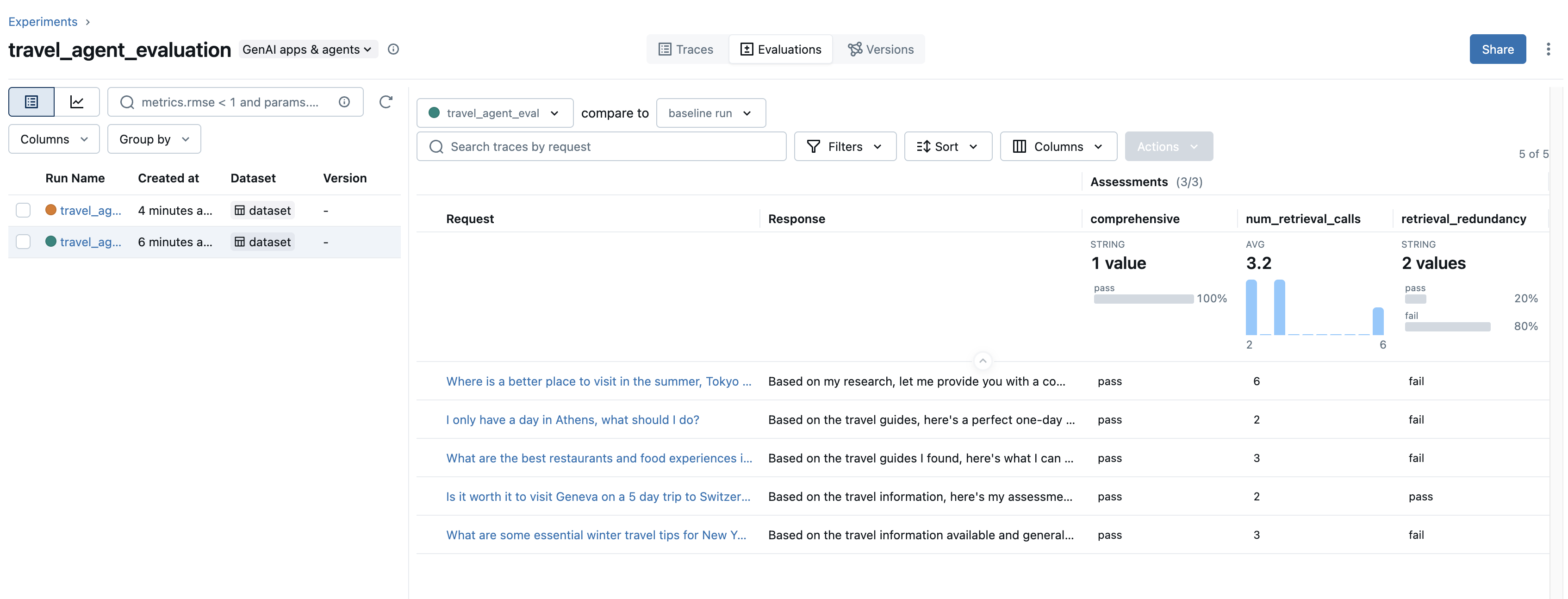
回到我们最初关于检索调用冗余的场景 - 我们可以看到我们的检索冗余判断器在许多测试用例上都失败了。为了解决这个问题,我们在系统提示中添加了一行,强调检索调用的效率。
TRAVEL_AGENT_SYSTEM_PROMPT = """
...
3. For travel information, use the `search_travel_docs` tool to extract relevant information about destinations, activities, logistics
  - When using this tool, please ensure you only query about a topic once. All queries should be completely distinct!
...
"""
重新运行我们的评估会产生以下结果:
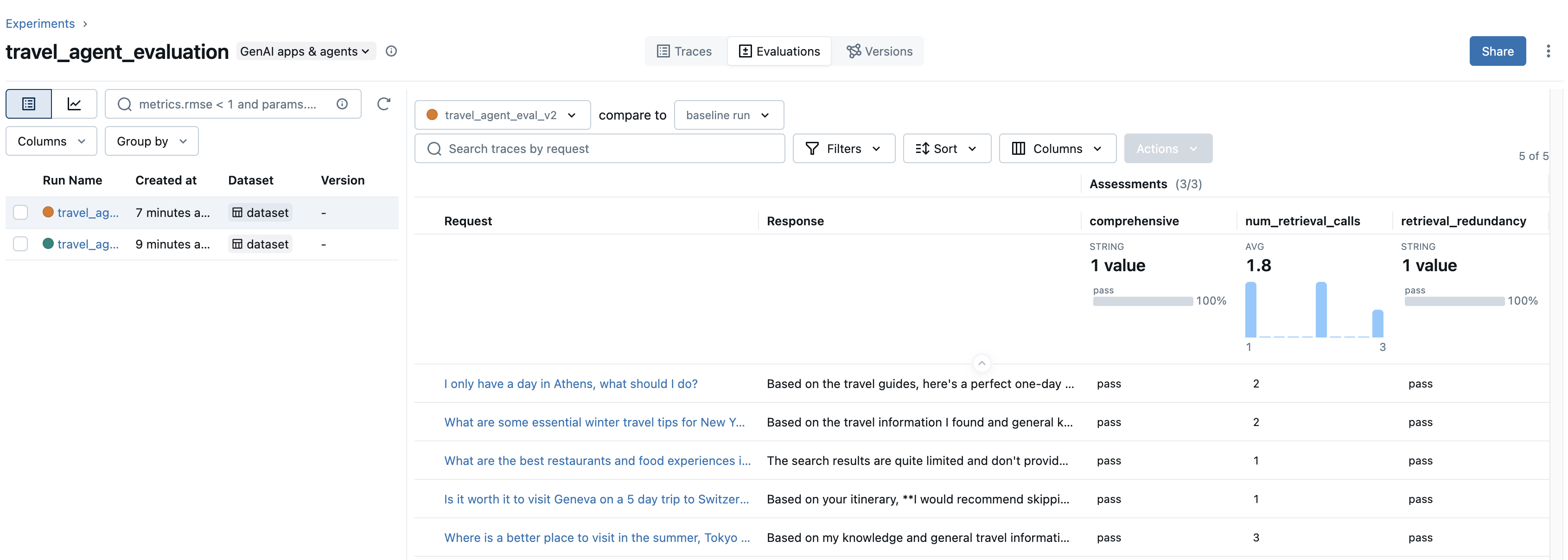
现在我们可以看到,检索冗余指标在所有示例中都已通过,并且在我们的更改后,平均检索调用次数从 3.2 降至 1.8!我们还通过全面性评分器保持了 Agent 的质量!
结论
原型化 Agent 不需要数月的基础设施工作。通过利用 Claude Agent SDK 和 MLflow 的可观测性工具,我们在传统方法所需时间的一小部分内构建并验证了一个旅行 Agent 原型。
关键要点
- 快速原型化:使用现有的 Agent 框架(如 Claude Agent SDK)快速验证您的想法。
- 自动跟踪:MLflow 的
@mlflow.anthropic.autolog()以零仪器化捕获 Agent 执行的每个操作。 - 自信地迭代:使用
mlflow.genai.evaluate()通过自定义评分器和判断器客观地衡量质量改进。
从第一天起就内置可观测性和评估功能,您可以自信地将系统可靠地从原型迁移到生产就绪的 Agent。下一步
- 探索 Claude Agent SDK 文档 以了解高级 Agent 功能。
- 了解 Claude Code 自动跟踪,以自动跟踪 Claude Agent SDK 和 Claude Code CLI。
- 阅读 MLflow 的评估和监控框架,了解完整的评估生态系统。